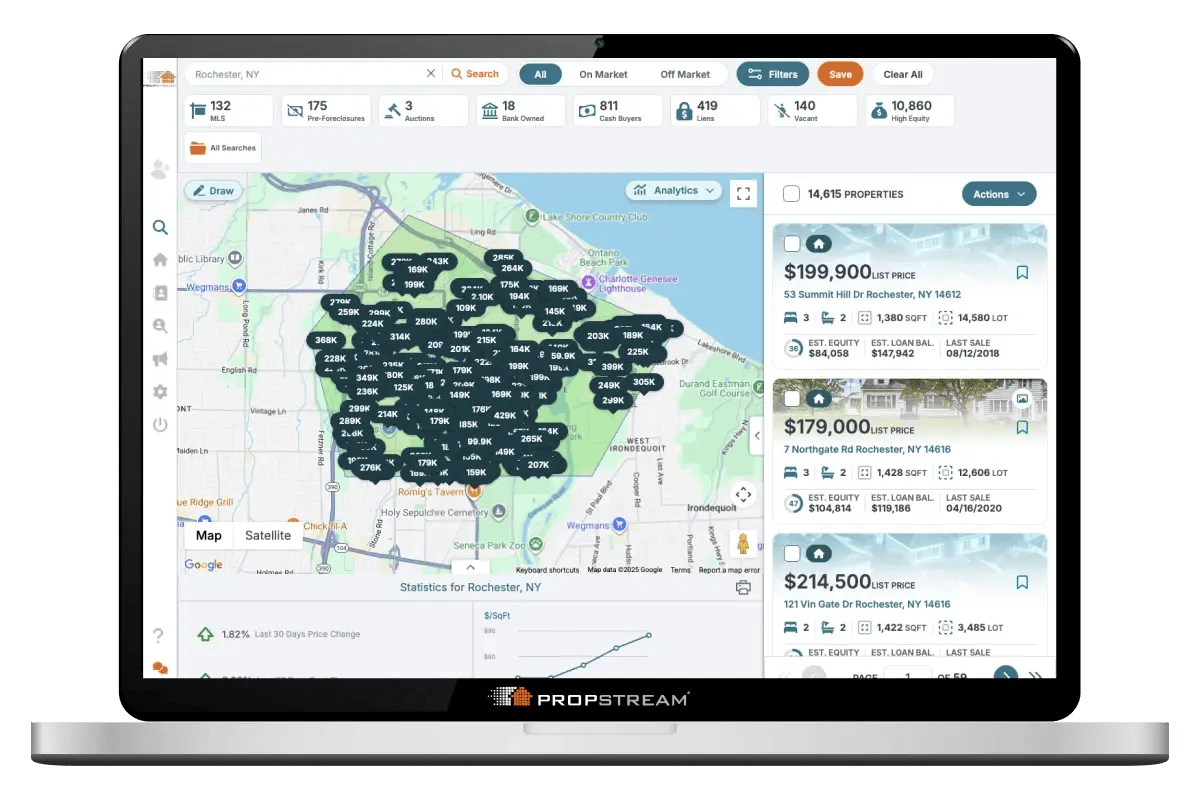
A Checklist for Using PropStream’s Real Estate Data Platform
Getting Started with the PropStream 7-Day Free Trial
Welcome to the PropStream community! We’re excited to assist you on your journey to find motivated real estate leads so you can grow your real estate business.
Here's Your Guide To Getting Started
While you’re eager to get started, you’ll find it helpful to take some time to get familiar with the PropStream ecosystem so you can get the most out of your free trial. After all, the goal of the 7-day free trial is to try out PropStream and see all the ways it can support your professional goals!
- Step 1
- Step 2
- Step 3
- Step 4
- Step 5
- Step 6
- Step 7
- Step 8
- Step 9
Step 1: Check Out PropStream and PropStream Resources
We offer a variety of resources to help you become comfortable with PropStream’s many features, including…
- The Ultimate Guide to Getting Started with PropStream!
- Free resource videos (check out searching for properties in PropStream!)
- Glossary of Real Estate Terminology
- PropStream Pros for real-world insights, strategies, and stories from successful real estate professionals
- Social media channels for the latest news, features, and real estate content
- Blog for the latest news and insight (check out our Beginner's Guide)
- PropStream Academy for courses that will help you navigate PropStream like a pro
Step 2: Get Hands-On with Live Onboarding and Daily Webinars
Start with a live onboarding session to learn the PropStream basics, get a guided tour of the platform, and see how to build your first lead list. Then, join our daily live webinars to dive deeper into property searches, deal analysis, marketing, outreach, and more.
Can’t make a live session? PropStream Academy gives you access to webinar replays and additional training resources so you can learn at your own pace.
Step 3: Search for Properties with PropStream
Easily search, filter, and uncover the right properties to grow your portfolio or close more deals.
- Find profitable deals fast with advanced property search filters.
- Identify undervalued properties and off-market opportunities.
- Pinpoint cash-flow rentals or fix & flip candidates.
- Analyze property history, comps, and neighborhood trends.
- Locate motivated sellers and potential off-market leads.
- Access nationwide property data in one place.
- Save searches and get alerts on new opportunities.
Step 4: Review Your List of Targeted Properties
- Navigate to the “My Properties” tab and select the list you’ve saved
- Review the properties you want to work with and save them as your favorites (Do this by selecting the checkbox next to the properties, selecting “Action” and then clicking “Add to Favorites” from the dropdown menu)
Step 5: Skip Trace Property Owners
Skip tracing is included with PropStream Connect, available free on Pro and Elite Plans, or as a $30/month add-on for Essentials users.
PropStream returns phone numbers and emails for homeowners and corporate owners, ranks contact information by likelihood of connection, and flags DNC-listed or known litigator contacts to help reduce risk. Results are typically available within minutes.
👉 Watch the Skip Tracing Video
Once you have contact information, you can launch outreach campaigns directly inside PropStream through PropStream Connect—no need to export or switch tools.
Tip: Export your lists anytime from My Properties to use in your own system.
Step 6: Call Leads Instantly with Click-to-Dial, Dialer Campaigns & BatchDialer
Click-to-Dial and Dialer Campaigns are included with PropStream Connect, available free on Pro and Elite Plans, or as a $30/month add-on for Essentials users.
Connect with leads directly inside PropStream, no extra dialer required. Launch structured outbound Dialer Campaigns or make live Click-to-Dial calls with one click from your saved properties or contacts, using automatically ranked phone numbers and real-time tracking to stay organized.
PropStream Connect supports up to 150 calls per day, with options to add team members or expand capacity as needed. Need more dialing power? BatchDialer lets you scale outreach to larger lists, streamline lead prep, and book more appointments faster.
Step 7: Send Direct Mail to Contacts
Once you have contact information, you can quickly create and send direct mail (postcards and letters) directly from PropStream. Choose from pre-designed templates or upload your own design, then launch targeted direct mail campaigns to your selected contacts.
Get discounted direct mail starting at 57¢ each with PropStream Connect, available free on Pro and Elite Plans or as a $30/month add-on for Essentials users.
Tip: You can send postcards to contacts on your PropStream marketing lists or your own imported lists, and customize campaigns using templates or blank designs.
Step 8: Download the Mobile App and Drive for Dollars
- PropStream’s mobile app will help you Drive for Dollars by automatically identifying potential opportunities when driving in your target neighborhood.
- Download our mobile app in the Apple or Google Play stores.
If you’d like to learn more about Driving for Dollars, join our Live Webinar every Friday. Or, take the Drive for Dollars with the PropStream Mobile App course in the Academy.
Step 9: Activate your Subscription
Now that you’ve explored PropStream and all its features, move on to a full subscription!
To get started, Go to “Settings” on the left-hand side navigation bar and follow the prompts at the top right side of the screen to activate your account. Or, call our customer support team toll-free at (877) 204-9040 to get started.
Welcome to the PropStream Family and happy searching!
Support For Your 7-day Free Trial
PropStream provides expert customer support, so if you have a particular question or need help, try one of the following:
- Check our resources page for videos or join a Live Webinar
- Read about the latest updates from our blog and discover the most useful tools for Real Estate Investors
- Call our customer support team toll-free: (877) 204-9040
- Email: support@propstream.com
- Chat live with support on our platform. Simply click the support button in the left-hand navigation.