| Release Highlights |
|
Found a promising real estate opportunity? Investor Outreach helps you answer the next question: Who might buy it?
Finding the right buyer can mean digging through outdated lists, public records, and separate outreach tools, often while the clock is ticking on a deal.
That’s why we created Investor Outreach. It extends PropStream’s Search, Identify, Connect, and Transact processes into disposition, helping you find potential buyers, assess their fit, and start outreach in one place.
Let’s explore how it works.
How Investor Outreach Works
Find Investors Buying Near Your Property
Select Investor Outreach from the left-side navigation menu in PropStream. On the Investor Outreach page, enter the address of the property you’re researching in the Subject Property search field and click Find Investors. You can also select a recent search to pick up where you left off.
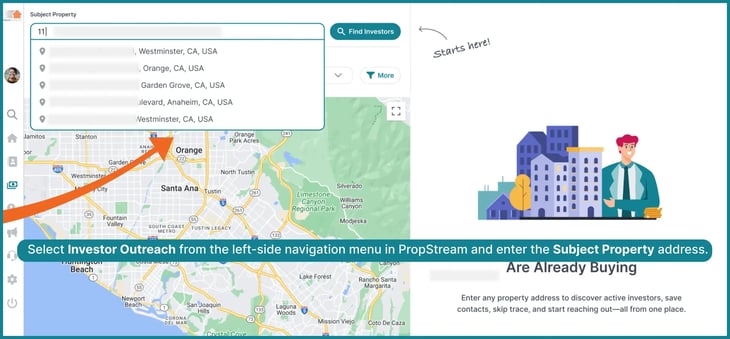
PropStream then populates a list of investors who have purchased near that property. Use the Interactive Investor Map to see where their acquisitions took place and explore buying activity around your subject property.
Narrow the Field and See Who Fits
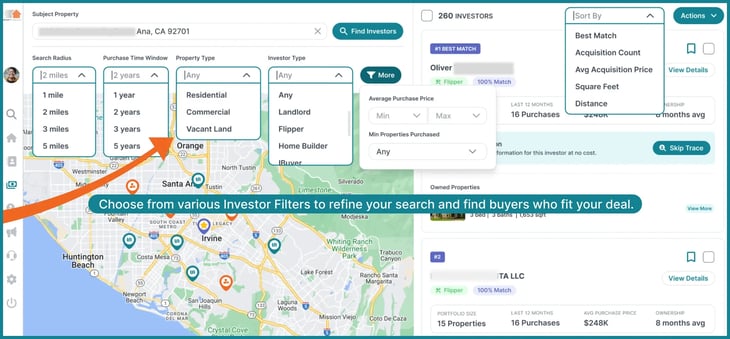
Use Investor Filters to focus on investors whose buying activity is more relevant to your deal.
|
Refine your search by adjusting:
|
Pro Tip: Sort by Best Match to review investors whose recent buying activity most closely aligns with your property. You can also sort by Acquisition Count, Avg Acquisition Price, Square Feet, or Distance when those details matter more to your deal.
Get to Know Potential Buyers: Investor Types and Profiles
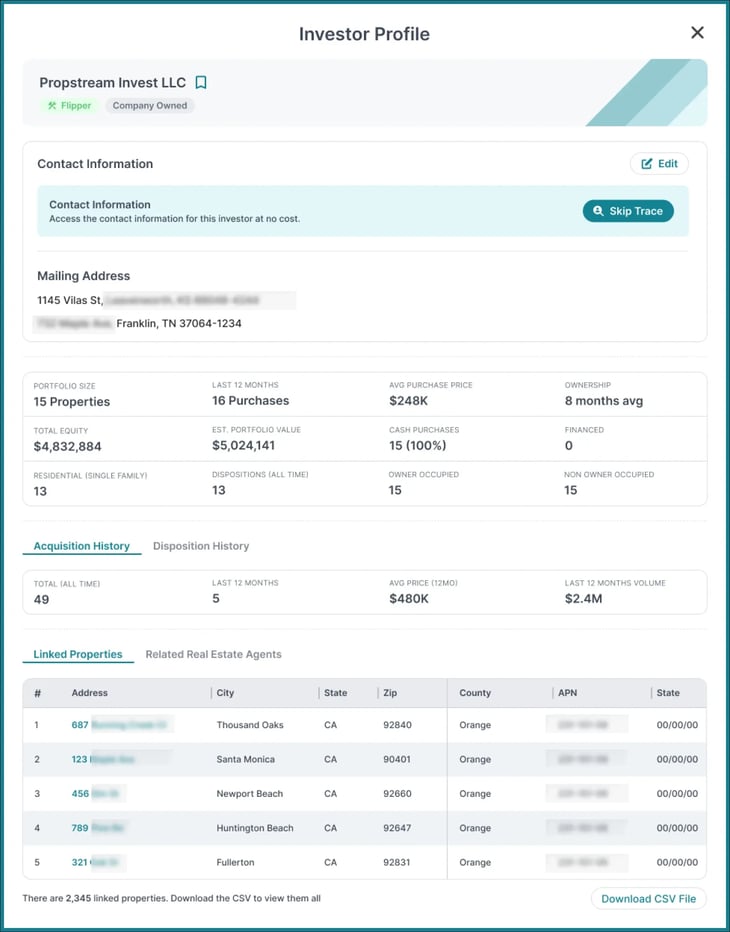
Once you’ve narrowed the results, click View Details to have a close look at the Individual's or LLC’s Investor Profile. Profile labels give you a quick overview of an investor’s activity and ownership.
You may see Investor Profile labels such as:
| Any | LANDLORD | FLIPPER | CASH BUYER |
| HOME BUILDER TRUST |
IBUYER | FINANCING | LAND BANK |
| COMMERCIAL LAND OWNER | TITLE COMPANY | REAL ESTATE INVESTMENT AND DEVELOPMENT | UTILITY COMPANY |
Pro Tip: Through Investor Profiles, you can explore detailed insights on a wide spectrum of buyers—from local individual investors to major institutions like banks and government agencies, and large investment firms like BlackRock, OpenDoor, Rocket Mortgage, and more.
|
You can review:
|
Pay particular attention to Acquisition History and Disposition History. Together, they show an investor’s past activity, giving you a clearer picture of their buying and selling patterns. Use that context to decide who belongs on your buyer list and what to ask when you reach out.


|
Stay Better Organized With Investor Profiles As you connect with potential buyers, use their Investor Profiles to keep track of each relationship. In each Investor Profile, Investor Status helps you track a contact from discovery through qualification and active buyer status. Use Touchpoints to log calls, emails, conversations, deals sent, follow-ups, and closed deals. When planning your next outreach attempt, review what you previously discussed and the investor’s preferences, and determine where the relationship stands before reaching out again. |
Creating an Investor List
After reviewing the surrounding Investor Profiles, save promising buyers to an Investor List—and name it strategically for easy access later on.
You can find your saved lists in My Contacts under the new Investor List section.
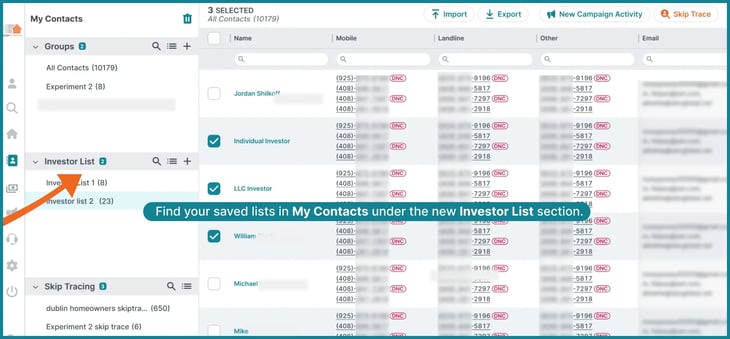
Note: Saves made through Investor Outreach count toward your plan’s monthly save limit.
Skip Trace and Start Your Outreach
Skip tracing is integrated throughout the Investor Outreach workflow, so you can find contact information at several points in your buyer search:
- Investor Search Results: Skip trace an investor directly from the Investor Results card.
- Investor Lists: Check Skip Trace Selected Investors as you add investors to a list or choose Skip Trace under the Actions dropdown.
- Interactive map: Start a skip trace from an investor’s Map Card.
- Investor Profile: Select Skip Trace under Contact Information.


Note: Even an individual skip trace requires saving into a new or existing Investor List. Saved lists are found under My Contacts > Investor List.
|
How much does skip tracing cost? Investor Outreach requires an active PropStream Connect subscription, which includes free skip tracing credits. For more information on PropStream Connect pricing, review our Pricing Page. |
Start Your Multi-Channel Outreach
After you’ve collected the necessary contact information via skip tracing, you can launch a multi-channel marketing campaign.
- Click-to-Dial helps you make individual calls to prospects with a single click.
- Dialer Campaigns allow you to cold-call an entire list while tracking who you’ve contacted and the results of each attempt.
- Email campaigns can be launched and tracked within the PropStream application.
Click-to-Dial
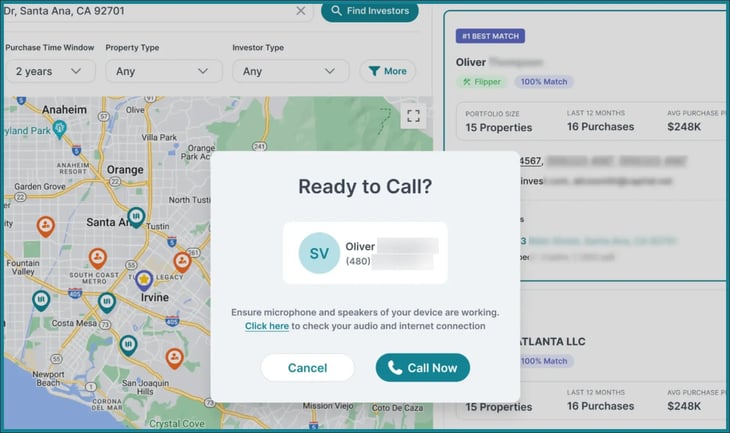
Click an unlocked phone number wherever it appears in Investor Outreach, including in search results, on an individual investor card, or in an Investor Profile. This opens the “Ready to Call?” softphone, so you can start a conversation as soon as you find an investor worth contacting.
Watch & learn more about Click-to-Dial.
Dialer Campaigns
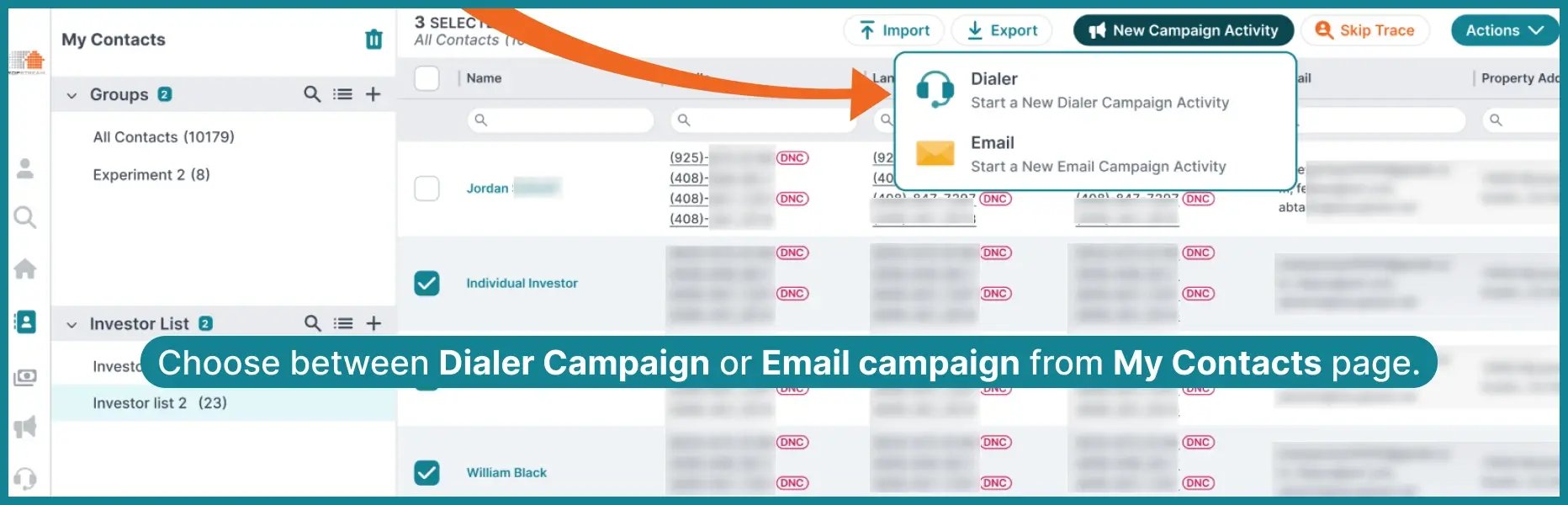
To call a group of potential buyers instead of dialing each one individually, you can start a Dialer Campaign from two places:
- Investor Search Results: Select the investors and choose Actions > New Campaign Activity > Dialer.
- My Contacts: Open your saved Investor List and choose New Campaign Activity > Dialer
Name the activity and assign the investors to a new or existing campaign list. This opens the existing Dialer Campaign workspace, and you can start calling the investors you selected.
Refer to our guide on 4 Ways to Get the Most Out of Click-to-Dial and Dialer Campaigns
Email Campaigns
To reach potential buyers by email, you can start a campaign from either place:
- Investor Search Results: Select the investors you want to send emails to, then choose Actions > New Campaign Activity > Email.
- My Contacts: Open a saved Investor List, then choose New Campaign Activity > Email.
After naming the activity and choosing a list, PropStream opens the email campaign workspace, where you can create and send your message.
For step-by-step instructions, watch our guide on How to Set Up Email Campaigns
Who Can Use Investor Outreach?
PropStream’s filters, data, and AI functions (AI Search and the PSI Assistant) help you find and evaluate properties. Investor Outreach carries that work into the disposition phase, helping you identify investors who may buy a property and providing a way to reach them
Fun fact: PropStream also offers a Cash Buyers Lead List (available with your regular PropStream subscription at no extra cost). However, you can save time, money, and resources by using Investor Outreach and Best Match to find investors near your subject property and streamline the disposition process.
And one last thing: don’t forget we have our LoanGeek integration to help you fund your next deal!
How Much Does Investor Outreach Cost and How Can You Add It to Your Account?
Investor Outreach is a $70/month add-on that requires an active PropStream Connect subscription.
- Pro and Elite Plans: PropStream Connect is already included, so Investor Outreach is $70/month.
- Essentials: Add PropStream Connect for $30/month if you don’t already have it. With both add-ons, the cost is $100/month in addition to your Essentials plan subscription cost.
Note: Get two months free for PropStream Connect and Investor Outreach when billed annually.
How to Subscribe to Investor Outreach?
.webp?width=1200&length=1200&name=frame_10_1%20(1).webp)

|
You can subscribe from two locations within PropStream:
|
Review the pricing and complete your payment to activate Investor Outreach. Essentials Plan customers without PS Connect will be prompted to combine both subscriptions.
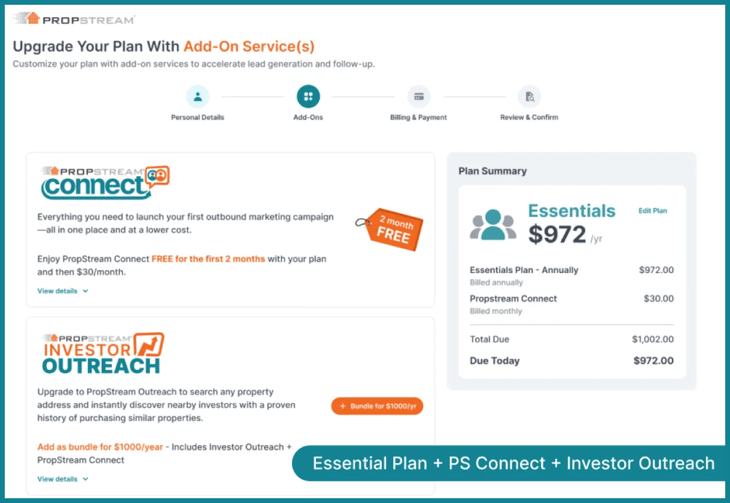
On a free trial? You’ll need to activate a paid PropStream plan first. Note that payment ends your trial and immediately charges your base-plan fee before you can proceed with the Investor Outreach purchase.
| Cancellation: You can cancel Investor Outreach separately without canceling PropStream Connect. Canceling Connect will also end Investor Outreach at the end of your billing cycle. |
Manage Team Access to Investor Outreach
If your account has an active Investor Outreach subscription, the Primary Account Holder can grant access to individual Full-Access team members in Account > Team.
.webp?width=730&height=420&name=Billing%20(1).webp)
- Adding a team member: Choose Add To Team, select Full-Access, then check Allow this user access to Investor Outreach before saving.
- Updating a team member: Find them in the Team Member list, open the three-dot menu > Edit Profile, then check or uncheck the same permission and save.
Note: Scouts cannot access Investor Outreach. The permission option appears only when the Primary Account Holder has an active subscription.
Explore Investor Outreach: Take Your Next Deal Further With PropStream
Finding a promising property, while important, is only part of the real estate transaction lifecycle. Moving it toward a sale means knowing who might buy it and how to reach them.
From identifying an opportunity to researching potential buyers and starting conversations, Investor Outreach enables you to manage more of your deal journey in one place, supporting every stage of Search, Identify, Connect, and Transact.
*PropStream engages an independent third-party to perform skip tracing.