
09.10.2026 PropStream
As the new year begins, PropStream is expanding how users move from property research to live outreach, all within the PropStream Platform. This release introduces two new dialing workflows and a simplified skip tracing experience, making it easier to move from property research to real conversations. Users can now choose how they connect with leads as they grow, from quick one-off calls to outbound campaigns at scale, supported by improved data accuracy, prioritization, and compliance visibility.
Together, these enhancements help build a complete lead-to-dial stack within PropStream, with easy integrations that support everyone from beginners to larger teams.
Overview of the Latest Updates
New and Enhanced Skip Tracing Workflow
We’ve simplified where and how skip tracing works in PropStream, making contact data easier to access directly from the workflows you already use.
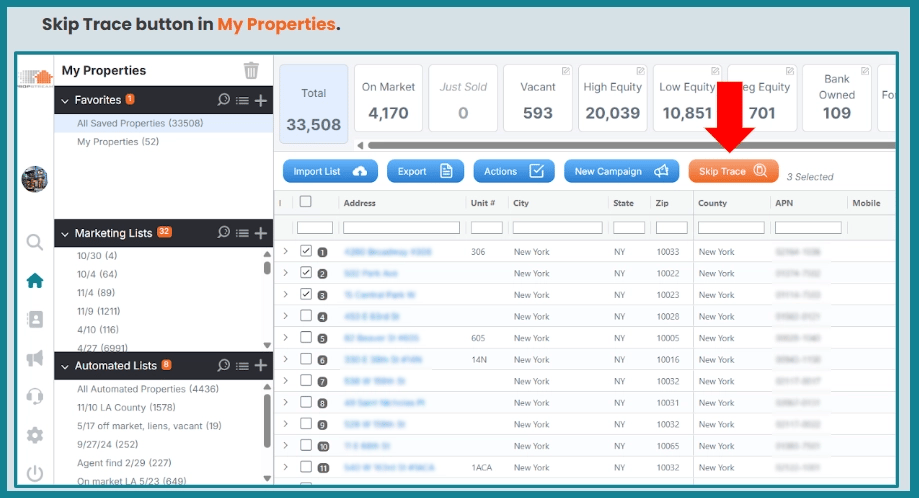
Skip Tracing UI/UX Changes at a Glance
|
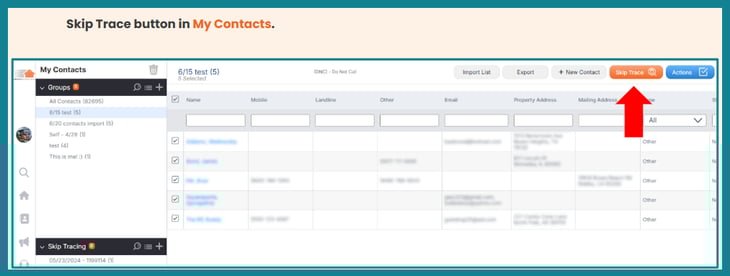
With these skip tracing enhancements, PropStream delivers more reliable, easier-to-use contact data that helps investors, agents, wholesalers, and outreach teams connect with the right people faster and with greater confidence.
| Note: Older skip traces will not populate in the Property Details Page; instead, it will display the date of the last skip trace. Users will be able to re-skip trace properties to refresh their lists. Once this is done, the information will appear in the Property Details Page. |
Combined with this new workflow is our improved multi-sourced skip-tracing, where you can now expect:
- Corporate Skip Tracing: Skip-trace company-owned properties using the property address with the same workflow and pricing as individual skip tracing.
- Contact Priority Ranking: Phone numbers and emails are ranked by likelihood of reaching the right person.
- Built-In Compliance Safeguards: DNC indicators and litigator flags now appear in the experience and exports.
- Smarter Exports: Exports now prioritize the highest-quality phone numbers and emails for faster outreach.
| Note: Explore the in-depth blog on the Updated Skip Tracing Experience for a closer look. |
Two New Ways to Dial from PropStream
In addition to helping users identify the right properties and uncover accurate contact data, PropStream now makes it easier to create your opportunities and take the next step to start real conversations. With two new dialing workflows to choose from, users can easily move directly from skip tracing to outreach.
Option 1: Click-to-Dial Inside PropStream
Click-to-Dial lets you place calls directly inside PropStream using a built-in softphone. With a single click on any phone number, a live call is launched with AI-guided prompts that suggest what to say next and steps to support more confident conversations.
You can place calls from anywhere a phone number appears in PropStream, including My Properties, My Contacts, and the Property Details Page. Once a contact has been skip-traced and a phone number is available, simply click the number to place a call using Click-to-Dial.
Check out the interactive demo below to learn how it works.
Click-to-Dial is free for customers with the Lead Automator add-on or included on the Pro and Elite plans.
Click-to-Dial Highlights at a Glance
If you are a trial user or not a Lead Automator customer, you can easily upgrade by clicking a phone number and following the upgrade prompts, making it easy to activate Lead Automator and begin calling immediately.
Pro tip: You can add PropStream Connect for $30, or upgrade to the Pro or Elite Plan for greater value that includes additional bonuses like list automation, free skip tracing, dialer capabilities, and direct mail discounts.
Option 2: Push to BatchDialer for High-Volume Calling
For users who want higher call volume, more dialer features, and controls, customers can opt to add BatchDialer and receive the added bonus of a native API connection, allowing skip-traced leads to be sent directly from PropStream into BatchDialer calling campaigns. This eliminates the need for CSV exports or manual uploads, helping teams move faster from list building to live conversations.
Check out the interactive demo below to explore how it works.
Once the BatchDialer API key is connected in PropStream, users can push leads directly from My Properties or My Contacts into existing BatchDialer campaigns—without leaving PropStream. Contact information and phone numbers are transferred cleanly, with control over how many phone numbers are included per record (3 is recommended). There are no additional fees for using the API integration beyond the existing PropStream and BatchDialer subscriptions.
Push to BatchDialer Highlights at a Glance
|
This workflow is ideal for wholesalers, outbound teams, and sales managers who rely on high-volume calling and coaching-driven environments.
Push to BatchDialer removes friction from high-volume outreach. Instead of exporting lists and managing uploads, teams can move skip-traced leads directly from PropStream into live calling campaigns in just a few clicks, creating a faster, more scalable path from research to real conversations.
Pro Tip: To support growing teams, active PropStream users receive 20% off on BatchDialer monthly plans for life, making it easier to scale outbound calling alongside your data workflow.
One Platform. Faster Connections.
With enhanced skip tracing, updated UI/UX, intelligent contact prioritization, and two flexible dialing options, PropStream removes friction from every stage of outreach. Whether you prefer one-click calling inside PropStream or high-volume dialing through BatchDialer, the goal is the same: reach the right people faster while interest is high.
Start your 7-day free trial to explore PropStream’s enhanced skip tracing and new dialing workflows.
Make sure you subscribe to our newsletter and follow us on social media for more detailed information on how to use these releases.