
02.3.2026 PropStream
PropStream has introduced a redesigned skip tracing workflow to make skip tracing faster, easier to access, and more intuitive across the platform. Rather than managing skip tracing from a separate navigation area, it’s now built directly into the workflows you already rely on, making it easier to move from research to action.
These updates build on PropStream’s enhanced skip tracing foundation, now powered by multiple best-in-class data vendors and improved access logic. The result is clearer workflows, improved visibility into contact results, and higher confidence when moving from research to outreach, whether you are making a few calls or preparing leads for high-volume dialing.
What’s New in the Enhanced Skip Tracing Experience
Alongside the updated skip tracing workflow, PropStream introduces expanded data capabilities designed to improve contact accuracy, coverage, and usability. These enhancements add deeper contact signals and more reliable information to support outreach decisions before dialing begins.
- Multi-Sourced Skip Tracing: Combines data from multiple vendors to deliver more accurate and comprehensive contact information.
- Corporate Skip Tracing: Enables skip tracing for company-owned properties using the property address with the same workflow and pricing as individual skip tracing.
- Contact Priority Ranking: Phone numbers and emails are ranked by likelihood of reaching the correct party.
- Built-In Compliance Safeguards: Clear DNC indicators and litigator flags appear within the experience and exported files.
- Smarter Exports: Export formats prioritize the highest-quality phone numbers and emails for faster outreach.
Check out this blog to learn more in-depth about multi-vendor skip tracing enhancements and the data included.
UI/UX changes as part of Enhanced Skip Tracing In PropStream
The updated skip tracing experience focuses on simplifying the workflow and reducing friction for our users.
Check out this step-by-step interactive demo to learn more.
New Skip Trace Button placements are aimed to simplify the skip tracing workflow and let users skip trace instantly when they are searching for properties.
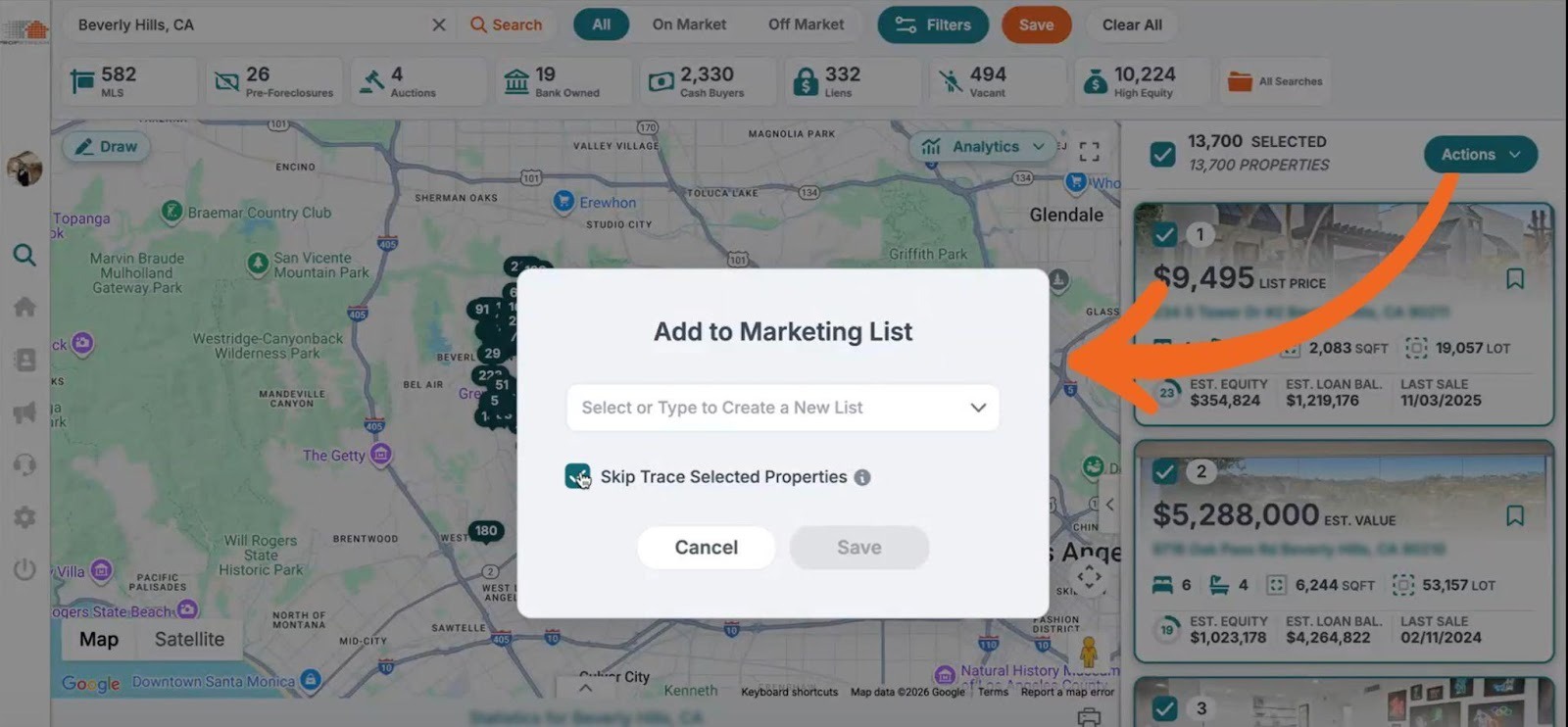
1) Users can now skip trace instantly when saving a list in a single step, directly from search results. You can use the ‘Actions’ drop-down to save the list and check the skip trace option.
2) Below is the new Skip Trace button located on the ‘Property Details Page’ under the ‘Contact Information’ section.
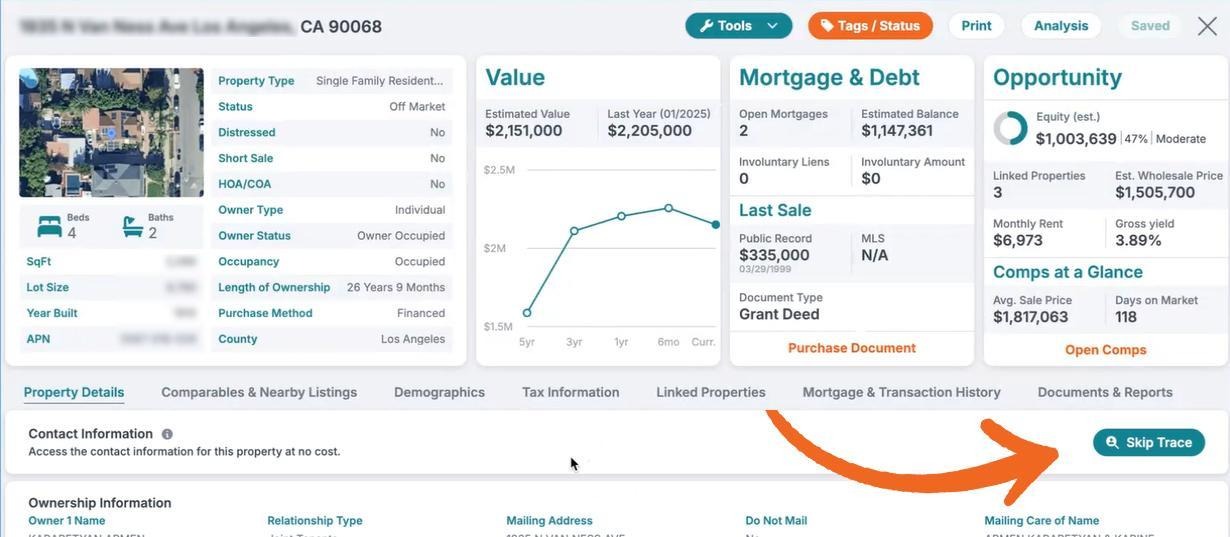 Users must have the PropStream Connect add-on or be on a Pro or Elite plan to skip trace at this step with ease. Otherwise, each skip trace must be purchased individually.
Once a property is skip-traced, the skip trace button changes to ‘Re-skip trace’ and you can re-skip trace directly from the Property Details Page, with results saved to a new list.
|
PropStream Connect includes free skip tracing, Lead Automator, Click-to-Dial, Dialer Campaigns, and discounted direct mail, making it easier to keep your leads enriched and ready for outreach. |
3) We have introduced a new skip trace button on the ‘My Properties’ tab; earlier, it was nested under the ‘New Campaigns’ drop-down.
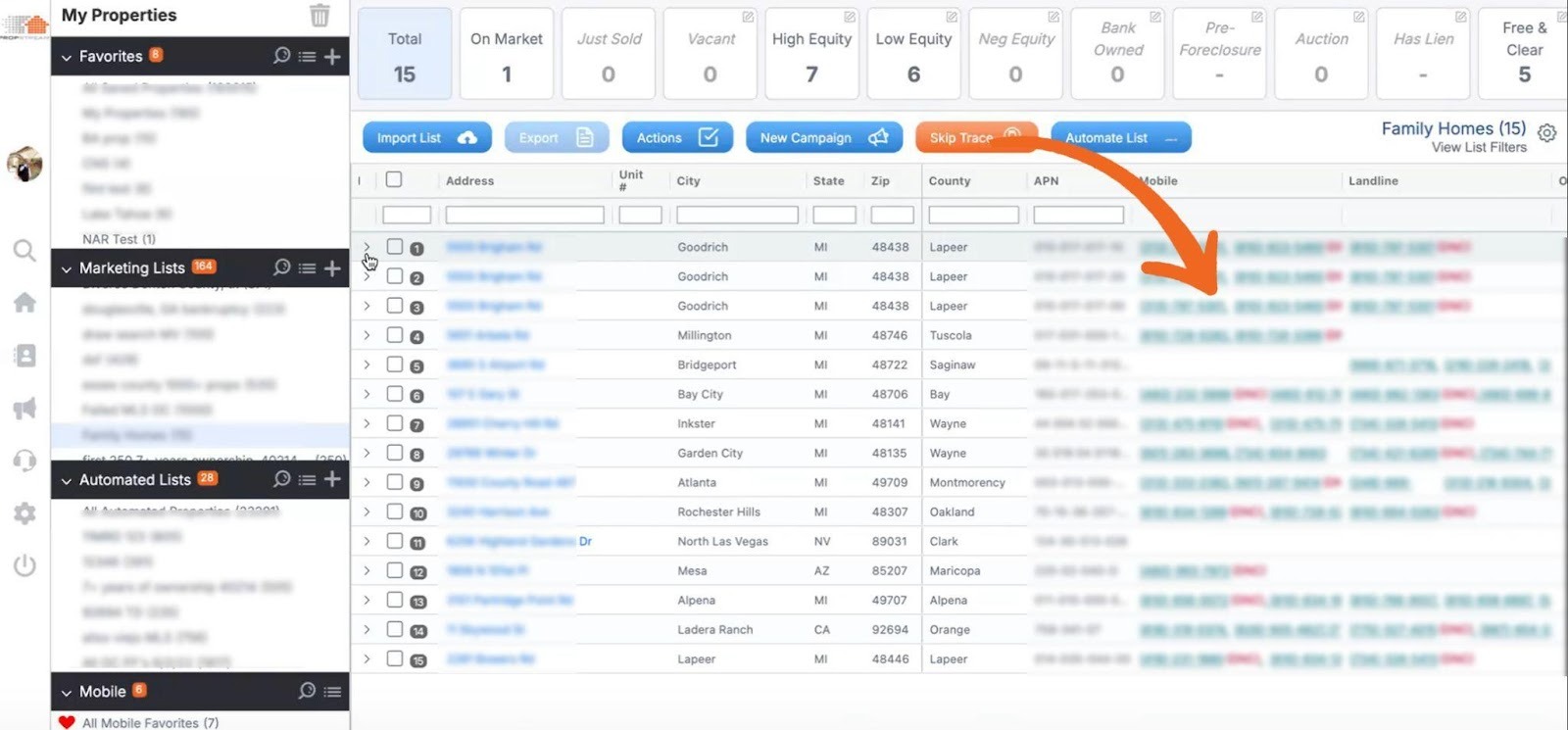
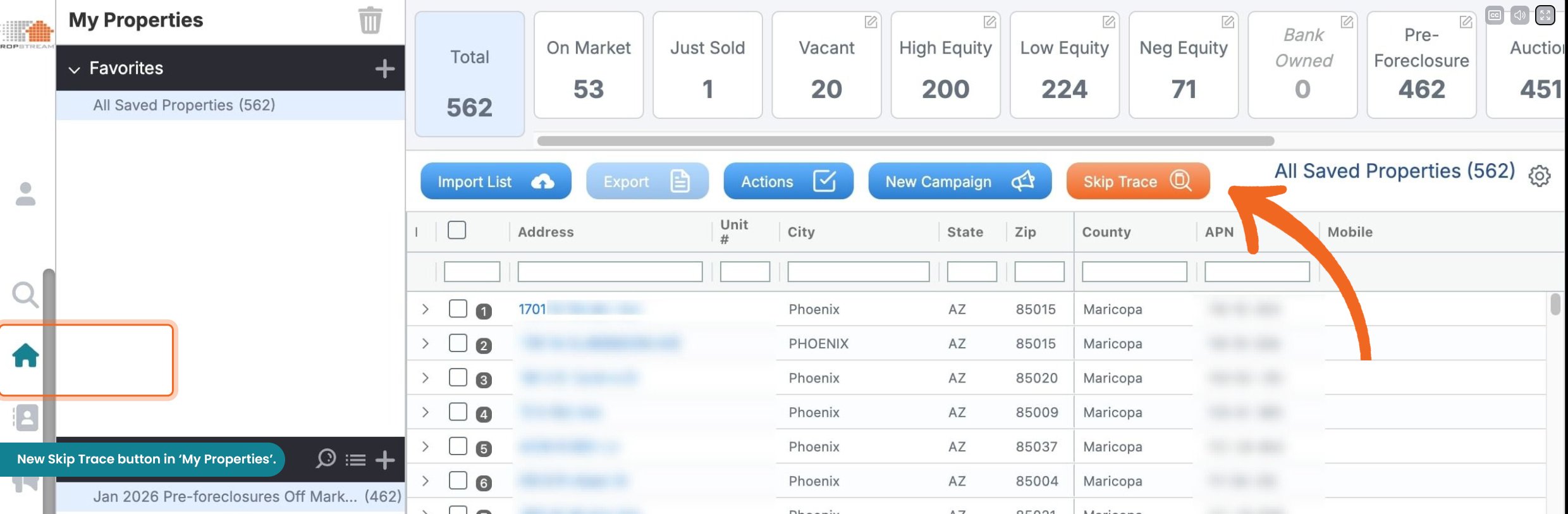 Once you skip-trace the selected properties in your list, phone numbers will populate directly within the list, and you can export them from here if needed.
Pro tip: Clicking a skip-traced phone number opens the built-in softphone, allowing you to connect with leads instantly via the Click-to-Dial workflow included with the PropStream Connect add-on.
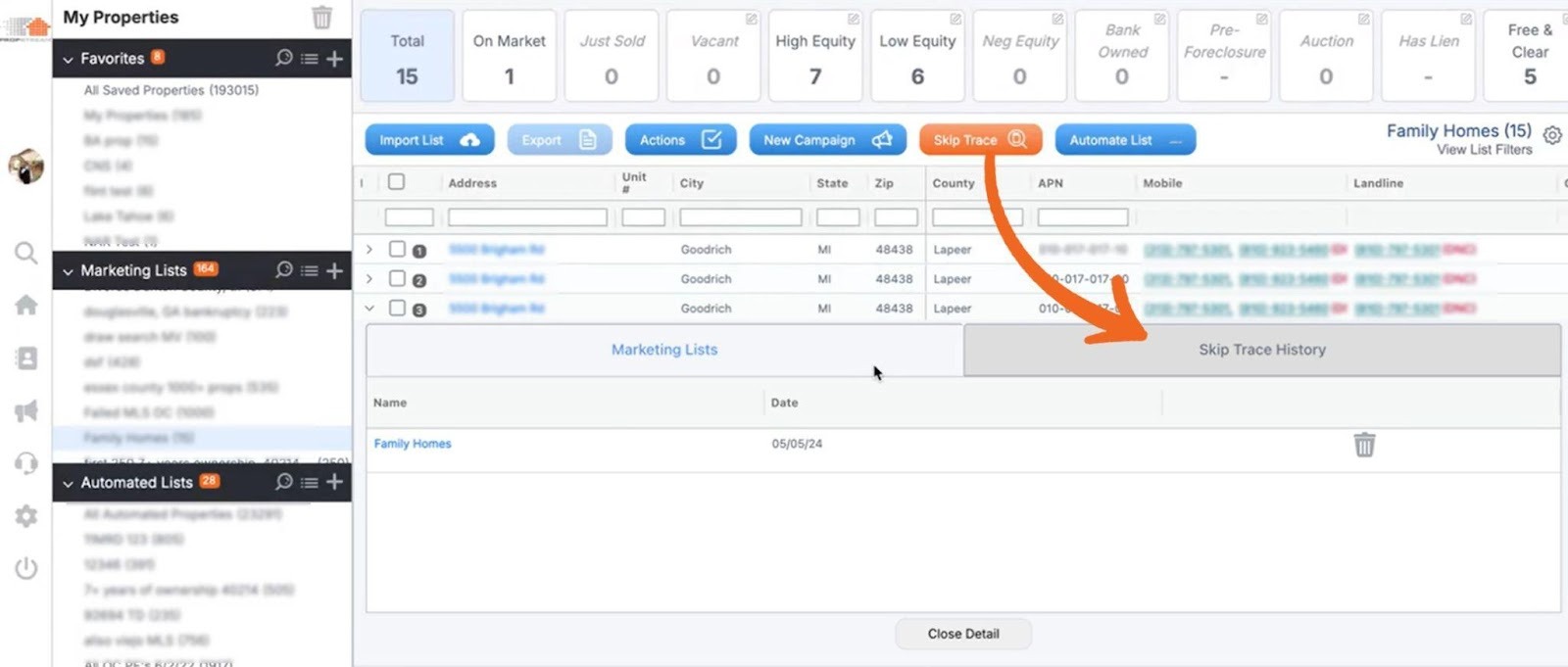
4) Skip-tracing history is now available and can be easily viewed in ‘My Properties’ for quick reference. You can access this by selecting the ‘chevron arrow’ next to the property name to view skip tracing history and marketing list details.
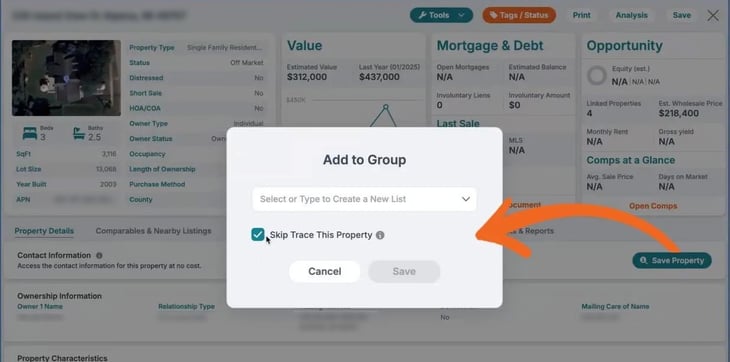
5) On the Property Details Page, users can now click the ‘Save Property’ button and skip trace while saving it to a new or existing list. Once saved, the button changes to ‘Skip Trace’.
6) Contact details now appear on My Properties, My Contacts, and Property Details Page, and My Contacts after a property is skip-traced.
|
Additional note: ‘The Skip Trace tab’ has been removed from the left-hand navigation as the broader UI enhancements now make it easier to skip trace directly within property and contact workflows, reducing clicks and making it faster to act on leads where you already work. |
What These Skip Tracing Updates Enable Next
The updated skip tracing experience is part of a broader release focused on helping users move faster from data to dialing inside PropStream. Alongside these skip tracing enhancements, PropStream introduced two new dialing workflows that build directly on skip-traced data.
- Click-to-Dial enables users to place one-off calls directly inside PropStream by clicking a phone number, making it ideal for individuals and smaller teams who want fast follow-up without managing campaigns.
Click-to-Dial comes included with PropStream Connect for just $30 per month.
Active PropStream users can unlock 20% off any BatchDialer monthly plan by signing up directly through the PropStream app.
- Push to BatchDialer supports high-volume calling by allowing skip-traced leads to be sent from PropStream to BatchDialer via a native API sync, enabling teams to run structured dialing campaigns at scale.
- Email Campaigns can also be powered by skip-traced email addresses, allowing users to run outreach and follow-up alongside calls and build more complete, multi-channel strategies from a single platform.
Together, enhanced skip tracing, flexible dialing workflows, and email-ready contact data create a more connected lead-to-dial stack, giving users multiple ways to engage prospects based on how they work today.


