
02.3.2026 PropStream
For users who rely on high-volume outbound calling, PropStream now offers a faster, more scalable way to move from property research to live conversations. With Push to BatchDialer, skip-traced leads can be sent directly from PropStream into active BatchDialer campaigns through a native API connection.
There are no CSV exports, no reformatting, and no manual uploads. Once the API is connected, users can push leads into dialing campaigns in just a few clicks, keeping outreach fast, consistent, and easy to manage at scale.
This workflow is ideal for investors and wholesalers looking to scale outbound calling with higher volume and advanced dialing controls.
Table of Contents |
What Is Push to BatchDialer?
Push to BatchDialer allows users with an active BatchDialer account to send skip-traced leads directly from PropStream into BatchDialer campaigns using a native API connection.
Instead of exporting lists and uploading files, users can push selected records directly into live dialing BatchDialer campaigns from My Properties and My Contacts.
1) Find the Push to BatchDialer option under the ‘Actions’ drop-down on ‘My Properties’.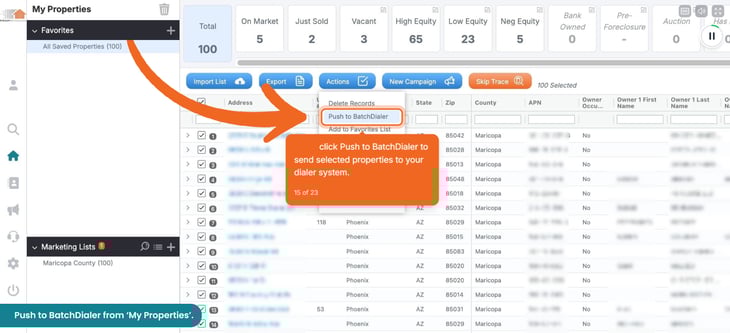
2) You can also access it from ‘My Contacts’ under the ‘Actions’ drop-down menu.
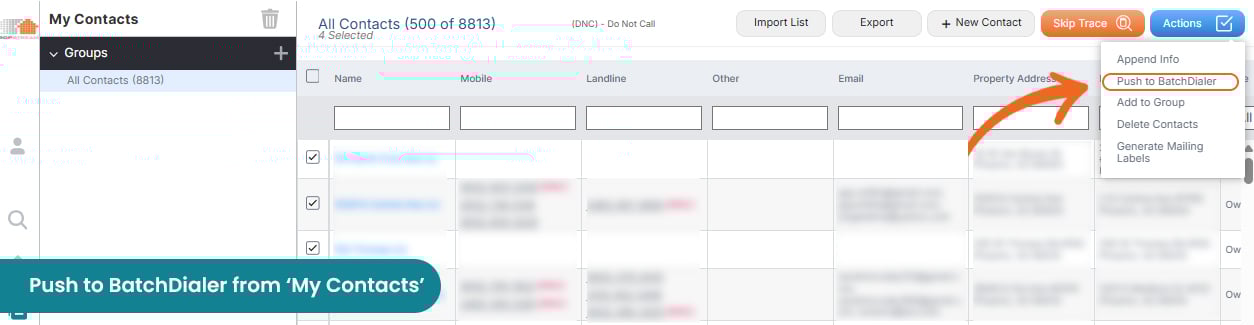
From either location, users can select one or multiple records and send them directly into an existing BatchDialer campaign. This facilitates a smoother transition from list building to outbound calling, especially for users running structured, high-volume campaigns.
For Push to Dial to work seamlessly, you need to first configure the BatchDialer API Sync and will need an active BatchDialer Subscription.
Active PropStream users can unlock 20% off any BatchDialer monthly plan by signing up directly through the PropStream app.
Push to BatchDialer is ideal for wholesalers, outbound sales teams, and managers who rely on high-volume calling and need speed, consistency, and control.
For individuals or smaller teams, BatchDialer can also be helpful if they make more than 150 calls per day and have additional supporting features. For lighter dialing needs, we recommend exploring Click-to-Dial.
How To Set Up the BatchDialer Integration in PropStream
To enable Push to BatchDialer, users must connect their BatchDialer account inside PropStream.
Watch the step-by-step interactive demo below if you are a visual learner.
1) Obtaining API Key From BatchDialer
This step requires an active BatchDialer account. Sign up for a 7-day free trial to get started, or active PropStream users can unlock 20% off any BatchDialer monthly plan for life by signing up directly through the PropStream app.
If you are an existing BatchDialer user, log in and go to ‘Account Settings’ and navigate to Integrations to see all the available third-party integrations and select ‘PropStream’ to view and copy the API Key.
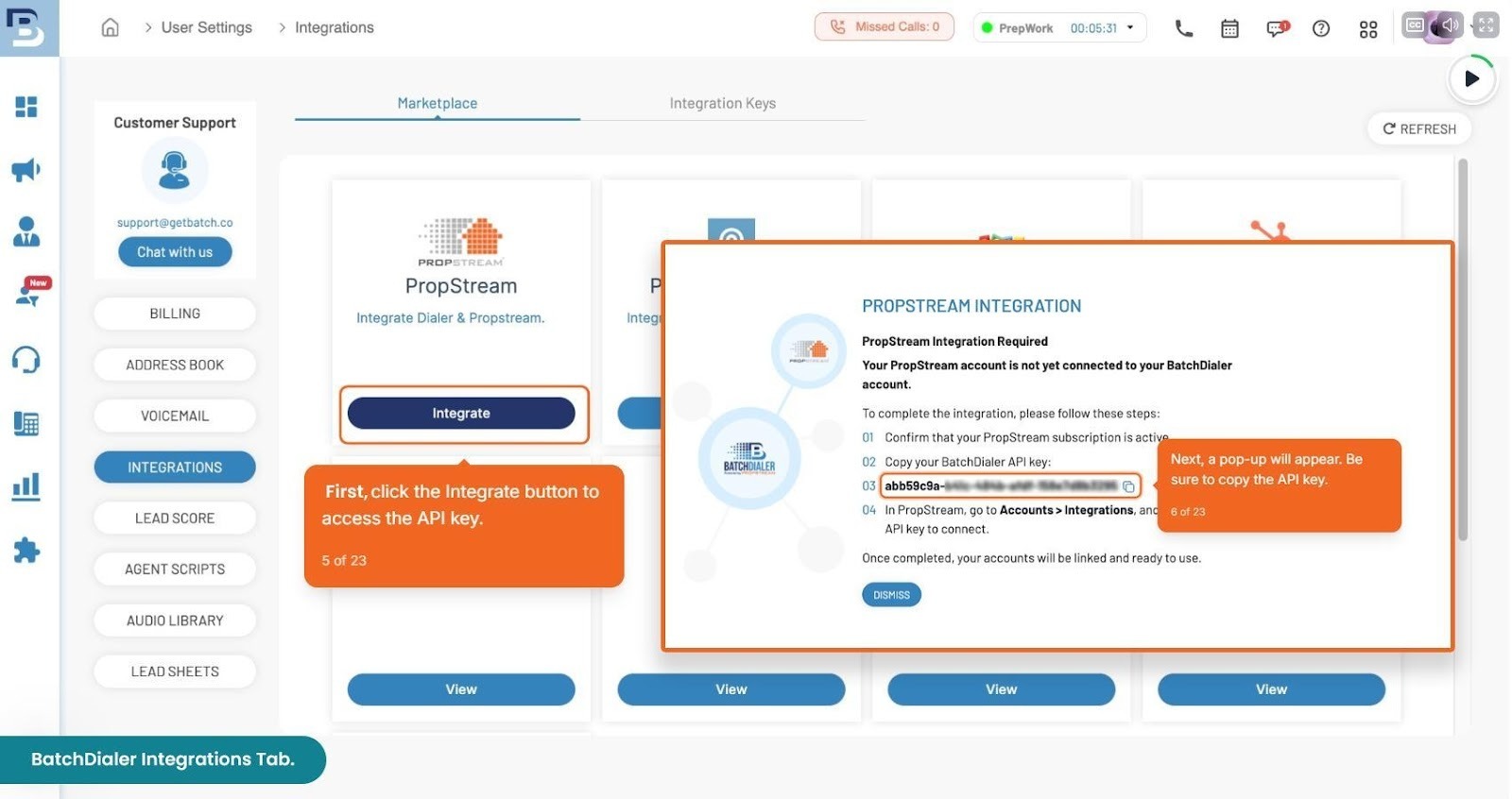
2) Configuring the API Key in PropStream
If you are an existing PropStream user, log in and go to ‘Account Settings’> then navigate to Integrations.
From there, users can:
- See ‘BatchDialer’ under ‘Integrations' and click on the ‘Connect’ button.
- Paste the BatchDialer API key to connect.
- You can enable or disable the API key, remove it, or check the connection status from here.
For Users with Team members:
- Enable full access for BatchDialer for team members by selecting the checkbox.
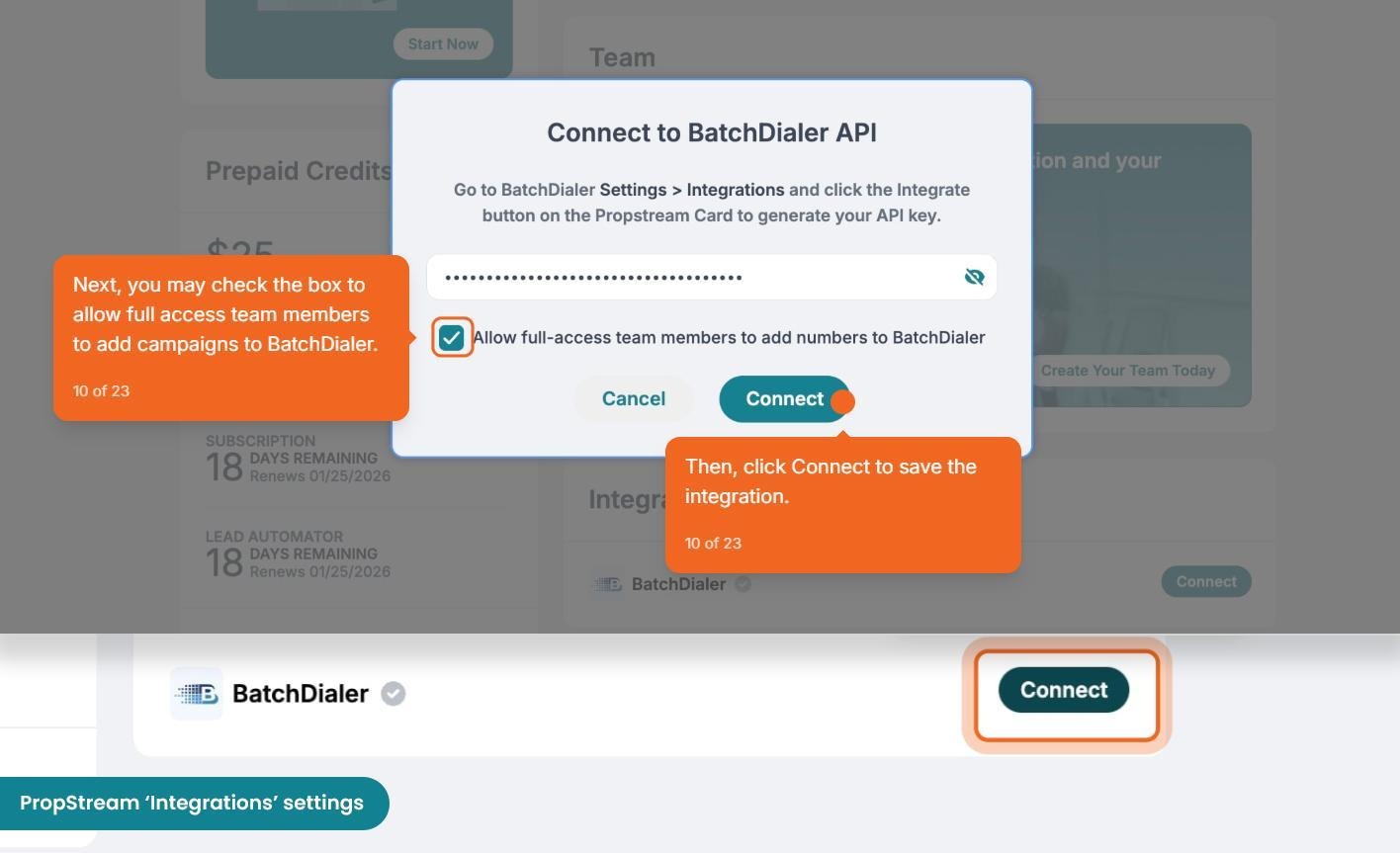
Note: If the API key is not connected, the Push to BatchDialer option is disabled, and users are guided through the setup process.
How To Push Leads to BatchDialer After API Setup
Once your BatchDialer API key is connected and the integration is active in PropStream, you can begin sending leads into BatchDialer campaigns directly from PropStream.
From My Properties or My Contacts, select one or multiple records you want to call. Next, open the ‘Actions’ drop-down and choose ‘Push to BatchDialer’. This launches a configuration modal where you can define how the selected records will be sent to BatchDialer.
|
The configuration pop-up allows users to:
(See image below.) |
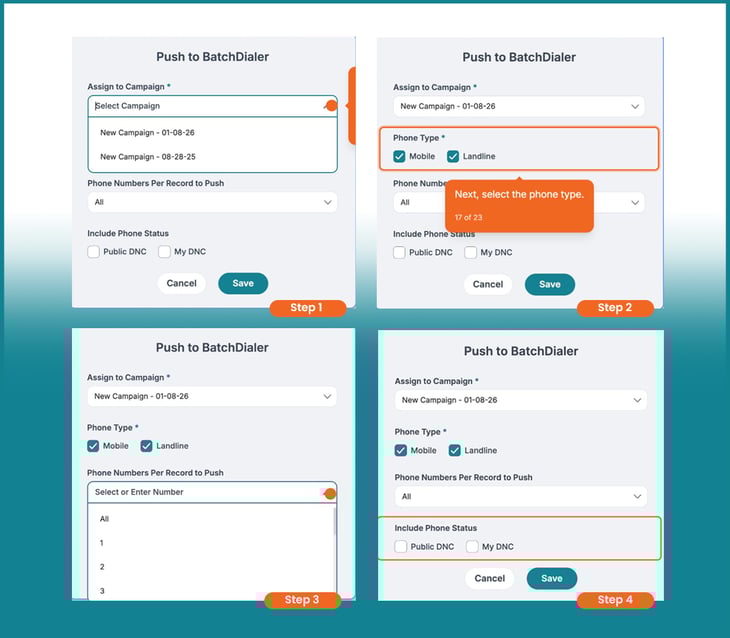
Pro Tip: For best results and answer rates, send three phone numbers per record.
Once the configuration is saved, a notification will appear confirming that your request has been processed. You can then head over to BatchDialer to initiate calling campaigns.
|
Check out the complete BatchDialer tutorial in the PropStream Academy to learn how to set up campaigns, manage dialing workflows, and start calling with confidence. |
Managing Team Access and Permissions
The Push to BatchDialer integration is designed to be flexible and easy for teams to manage.
Admin controls:
- Enable or disable the BatchDialer API connection.
- Enable or disable dialer access for all full-access team members to push leads.
- Adjust access for individual team members from the Teams page or the permission pop-up.
‘Team Access’ & permission controls menu.
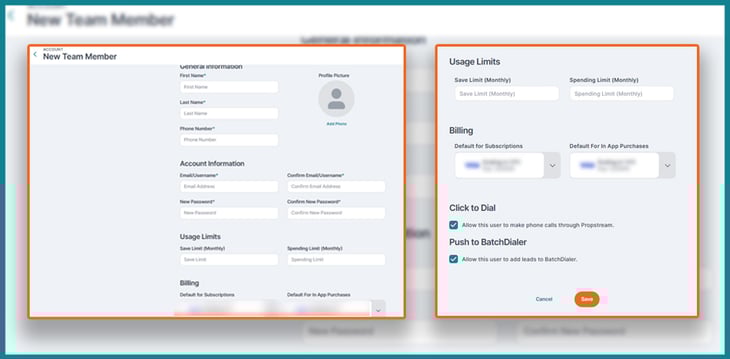
If a team member attempts to push leads without permission, they will see a user guidance notification explaining that access must be enabled.
How PropStream Is Enabling a Faster Lead-To-Dial Stack
With the introduction of Click-to-Dial and Push to BatchDialer, PropStream continues to evolve how users move from finding deals to connecting with them, all within a unified workflow. Whether you are an individual user making quick, one-off calls or a team running high-volume outbound campaigns, these dialing options are designed to support how you work today while giving you room to scale.
By combining property research, skip tracing, and outbound calling into a single ecosystem, PropStream continues to evolve into a true all-in-one platform that helps users act faster, reduce friction, and connect with motivated sellers more efficiently.
Start your 7-day free trial of PropStream to explore Click-to-Dial, Push to BatchDialer, and enhanced skip tracing in one seamless experience.


