
09.23.2026 PropStream
Release Highlights |
|
Here's what's new in My Properties and My Contacts:
|
Over the past year, we've been modernizing the PropStream experience one page at a time.
Our latest update marks another major milestone by bringing My Properties and My Contacts into the platform's modern design system, creating a more consistent experience wherever you work in PropStream.
The best part?
Your workflows haven't changed. Every action, filter, and tool you rely on is still here.
This update focuses on improving usability, organization, and responsiveness, not on changing how you manage your properties and contacts.
Let’s dive into the interface updates you can expect to see when you next log in.
A More Consistent and User-Friendly PropStream Experience
You may have noticed that our platform looks very different from how it once did. We’ve been working diligently with some of the best minds in the tech space to design an interface that is both aesthetically pleasing and user-friendly.
However, these changes take time, especially when you’re committed to the level of performance that PropStream is. This release closes that gap by refreshing two of PropStream's most frequently used pages.
| The result: a cleaner, more intuitive interface that’s cohesive with the rest of the platform. |
Within the My Properties and My Contacts pages, you’ll notice updated tables, menus, drawers, buttons, and status indicators, all designed to make navigating PropStream feel more natural and consistent.
Most importantly, behind the scenes, your data and workflows remain exactly the same.
What's New
Action Menus Are Now Easier to Navigate
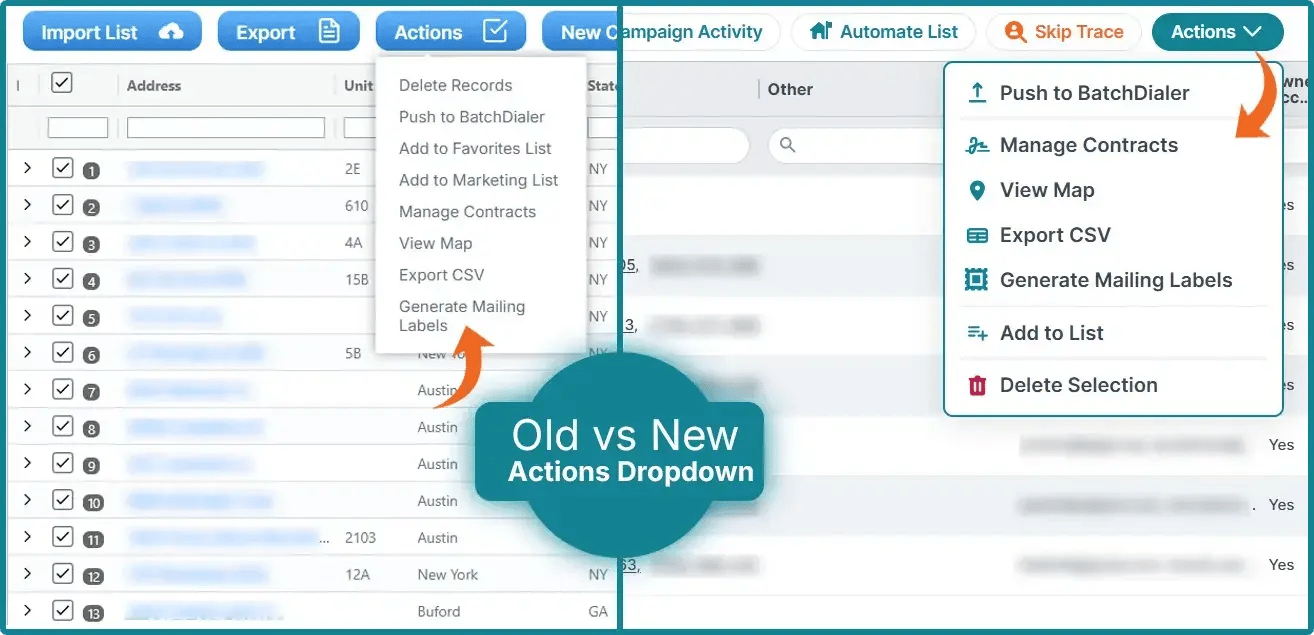
One of the first changes you'll notice is a refreshed Actions menu. Options within the menu are now grouped more logically with updated icons, clearer labels, and visual separators that make it easier to find what you're looking for more quickly.
|
A few menu items have also been renamed or reorganized:
|
These updates are intended to make the menus easier to understand while maintaining the current functionality. Every action is still available; some are just organized a little differently.
Built to Work Better on Any Screen
Whether you’re working from a tablet, a laptop, a desktop, or a mobile device, one of the aspects PropStream prides itself on is the flexibility of working where you want.
To support this flexibility, both My Properties and My Contacts are now fully responsive, adapting as you resize your browser window. Buttons intelligently collapse into icons when space is limited, long list names adapt to the layout, and helpful tooltips make it easy to identify actions at any screen size.
One of the biggest usability improvements is on the individual contact page, which now fits smaller browser windows without requiring horizontal scrolling. Additionally, menus that previously extended off smaller screens have been repositioned so they're always fully accessible.
In the world of real estate, speed is vital, and small improvements like this help you get the information you need faster, which may help you land your next deal.
Refreshed Tables and Visual Improvements


This update also introduces several visual enhancements throughout both pages to make information easier to scan and interact with.
|
Highlights include:
|
While these improvements modernize the interface, they're all designed to help you complete the same tasks more efficiently without changing your existing workflow.
Nothing About Your Workflow Has Changed
Although the interface looks different, everything you rely on is exactly where you need it.
Your saved properties, contacts, marketing lists, filters, searches, and workflows all remain unchanged. The update simply provides a cleaner, more consistent experience across PropStream while making the platform easier to use on screens of all sizes.
Log In and See What's New!
The refreshed My Properties and My Contacts experience will be available automatically the next time you log in—no setup required.
Explore the updated interface and enjoy a more consistent PropStream experience designed to help you stay focused on what matters most: finding opportunities and growing your business.

*PropStream engages an independent third-party to perform skip tracing.