

09.14.2026 PropStream
Finding the right investment opportunity starts with building the perfect search.
To help you find your ideal list of leads quicker and more efficiently than ever, we’ve introduced a new enhancement to PropStream’s Property Search function: AI Search!
Simply enable AI Search to describe your target property—either by typing or speaking in plain language. By interpreting your intent and automatically selecting the relevant Property Search filters, AI Search enables you list stack to create precise, advanced, targeted searches in mere seconds.
The best part? PropStream still offers the same robust library of filters and Lead Lists, but now you can search immediately without manually exploring various filter combinations (unless you want to).
Let’s explore this enhancement in full.
|
Key Benefits of AI Search With AI Search, you can:
|
Search the Way You Naturally Think
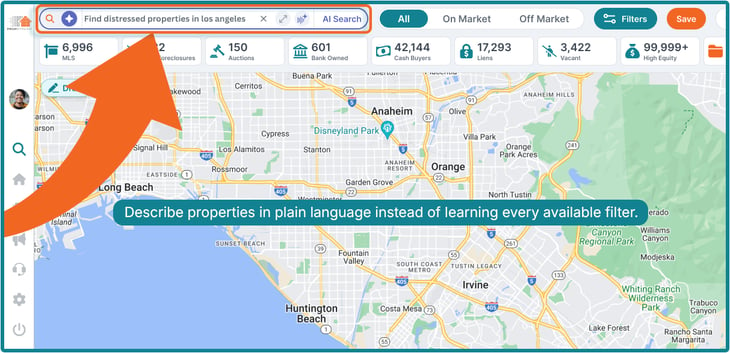
Instead of manually selecting your filters, AI Search lets you search the way you'd explain an ideal lead to a colleague.
For example, you could say:
- Find absentee owners with at least 50% equity in Phoenix.
- Show me vacant tax-delinquent properties headed to auction in Los Angeles.
- Find pre-foreclosures in Dallas with high equity.
AI Search translates your request into the same trusted Property Search filters that PropStream users already rely on every day. It doesn't introduce new datasets or hidden criteria—it simply makes the existing search experience faster and easier to use.
Built for New and Experienced Users
AI Search is available to all PropStream subscribers, regardless of plan tier.
So, whether you're brand new to PropStream or a seasoned investor, AI Search helps you list stack for effective searches faster—without the learning curve!
For newer users, it removes the need to learn which filters exist or how they work together. For experienced users, it dramatically reduces the number of clicks needed to create complex searches.
Type or Speak Your Search
AI Search supports both text and voice input.
Type
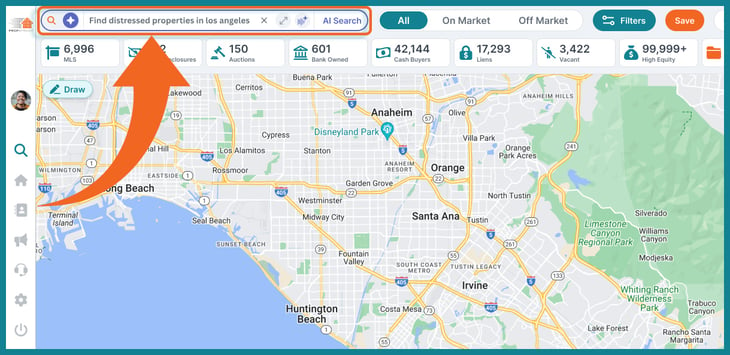
- The search bar shows a prompt with guidance on what to enter.
- Users type a request in natural language (e.g., senior owners with 50% or more equity in San Francisco).
- An "x" clears the field, allowing you to resubmit your prompt.
- Submitting via the AI Search button or Enter opens a chat panel attached to the search bar.
- Submissions are limited to 160 words max. The input area remains a fixed size during typing, and longer entries will truncate when focus is lost.
- Dedicated expand and collapse controls allow you to easily open and close the chat panel. Chat history is preserved and reappears when expanded.
- Users can keep the conversation going after filters are applied and close the panel without affecting the filters.
Voice
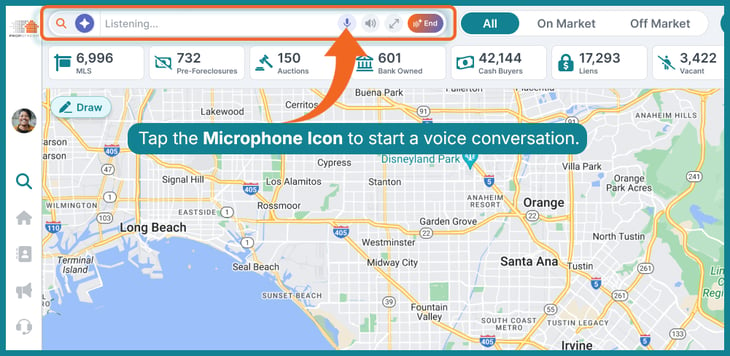
- A microphone icon starts a spoken conversation that follows the same conversational flow as text.
- Interface states: "Listening…" before speech, a live waveform while the user speaks, and "AI is responding…" when AI replies.
- Users can mute their mic or mute AI's voice responses independently.
- Expanding shows the full transcript and conversation history.
AI That Asks Questions Instead of Guessing
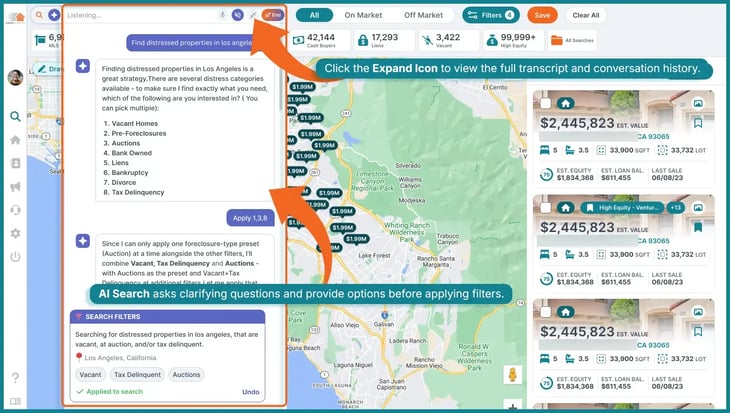
Real estate searches are often nuanced.
If your request isn't specific enough, AI Search won't make assumptions. Instead, it asks clarifying questions before applying filters.
For example, if you ask for "distressed properties in Los Angeles," AI Search may ask which distress categories you want to include, such as:
- Pre-Foreclosures
- Auctions
- Bank Owned
- Vacant
- Tax Delinquent
- Liens
- Bankruptcy
- Divorce
Similarly, if you search for a location with multiple possibilities (e.g., a city name that exists in several states), AI Search asks which one you mean before continuing.
Complete Transparency Into Every Search
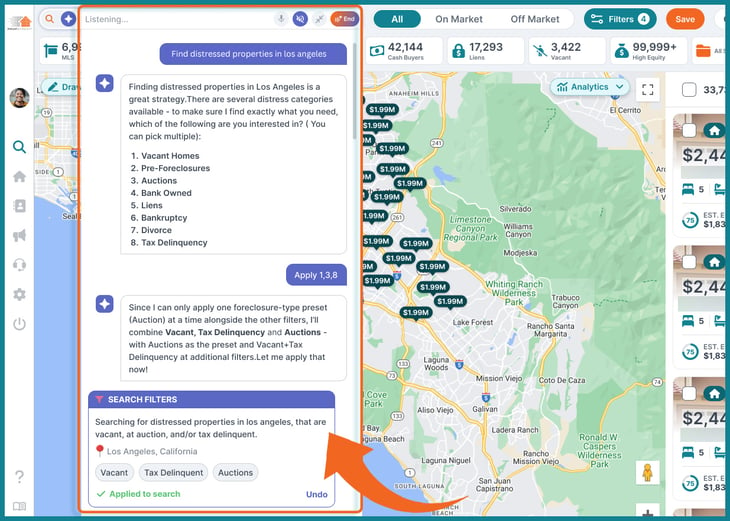
One of AI Search's biggest advantages is that nothing happens behind the scenes.
Before running a search, AI Search summarizes how it interpreted your request.
After the search runs, it explains exactly which filters were applied and why. Those filters also appear in the standard Search Filters panel, where you can review, edit, or remove any of them just as if you had configured them manually.
This means you always remain in control of your search.
Everything You Already Love About Property Search Stays the Same
AI Search is designed to enhance Property Search—not replace it.
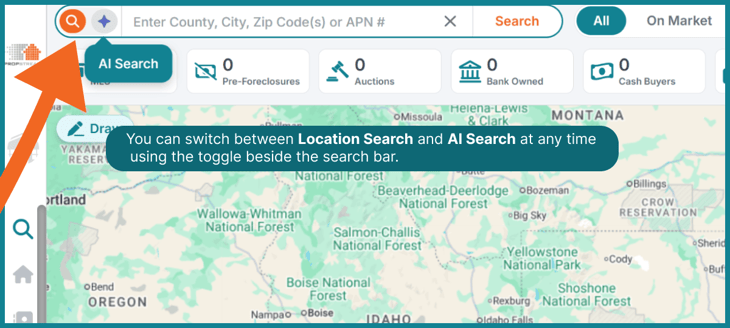
Location Search remains the default search mode, and users can switch between Location Search and AI Search at any time using the toggle beside the search bar. Existing searches, Map View, Saved Searches, exports, Property Details, manual filtering, and all existing Property Search functionality continue to work exactly as they always have.
In other words, AI Search is an optional, conversational layer built on top of the powerful search engine that PropStream users already trust.


