
08.18.2026 PropStream
| Quick Answer: PropStream Direct Mail offers three send types to fit different marketing goals. Single Send delivers one mail piece to your entire audience, Multi Send automates a sequence of mailers to keep you in front of prospects over time, and A/B Split Test lets you compare two versions of a mailer to determine which performs best. Choosing the right send type depends on whether your goal is simple outreach, consistent follow-up, or campaign optimization. |
Direct mail remains one of the most effective ways to connect with motivated sellers, generate leads, and build brand awareness.
But creating a successful campaign isn't just about choosing the right audience or designing an eye-catching mailer—it's also about selecting the right send strategy. PropStream Direct Mail offers three flexible send types—Single Send, Multi Send, and A/B Split Test—each designed to help you achieve a specific marketing objective.
In this guide, we'll break down how each send type works, when to use it, and how to choose the best option for your next direct mail campaign.
To learn more about the updated Direct Mail experience in full, check out this article.
|
|
| If you want to... | Use... |
| Send one mail piece to everyone | Single Send |
| Automatically follow up over time | Multi Send |
| Compare two mailers to see which performs better | A/B Split Test |
Pro Tip: PropStream Connect is an add-on bundle that helps you save on Direct Mail while providing all the resources you need to launch a multichannel marketing campaign!
Single Send
What It Is
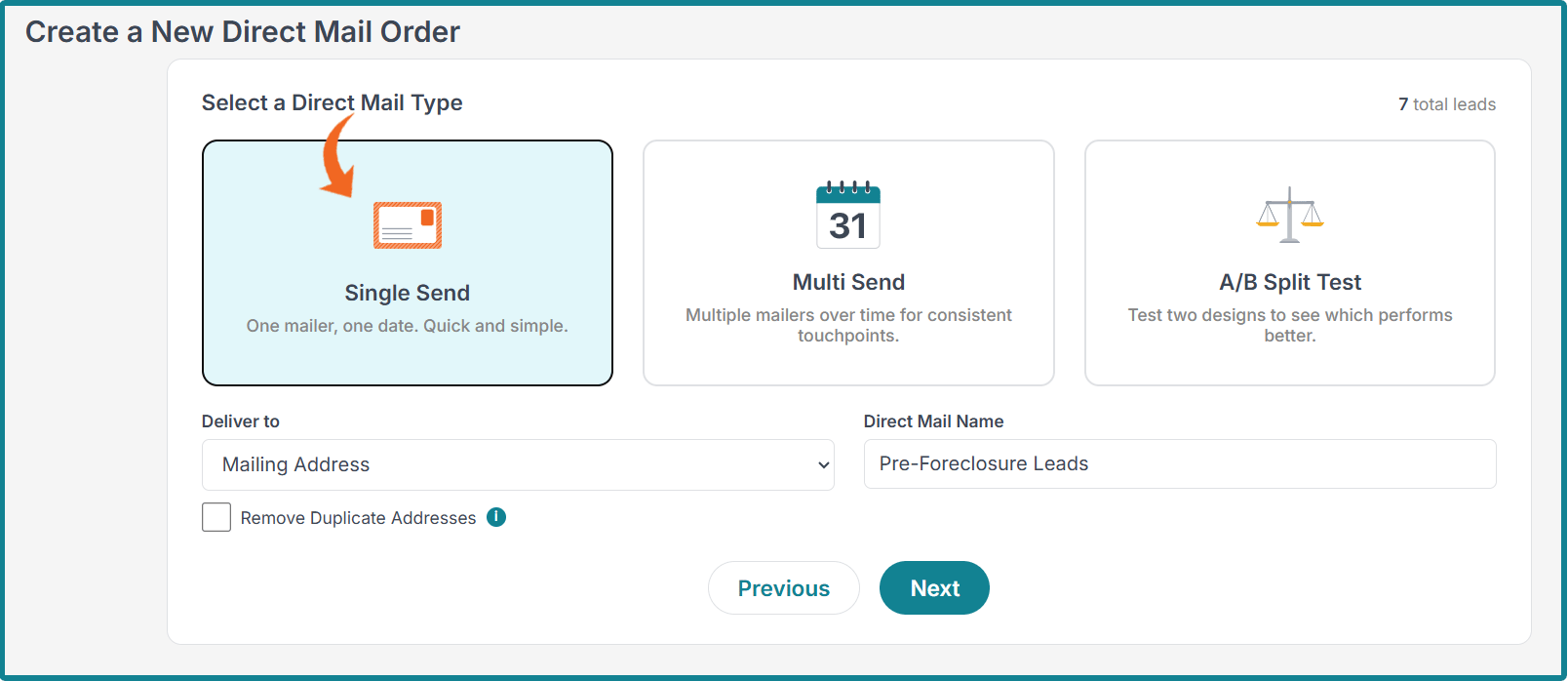
With this send type, a single mail piece is sent to each recipient in your selected audience. Everyone receives the same design, messaging, and offer, making it an ideal choice for campaigns with a single, consistent objective.
Single Send can be the simplest way to start your first direct mail marketing campaign because it lets you get your message in front of your audience quickly, without the learning curve of managing multiple mail pieces or testing variations.
Because there's only one version of your mailer, campaign setup is straightforward, allowing you to focus on creating a compelling message and reaching the right recipients immediately.
How It Works
Setting up a Single Send campaign only takes a few steps:
1. Start a New Direct Mail Campaign
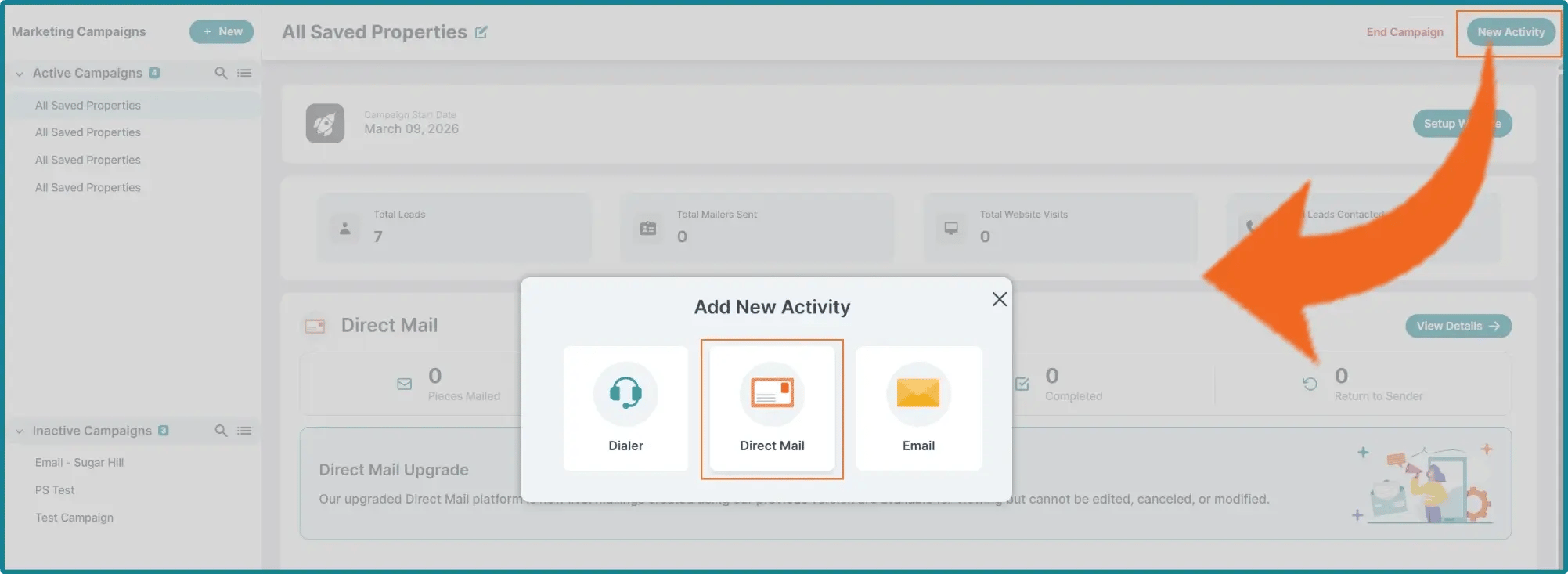
Start by navigating to the Campaigns section and clicking New Activity. Choose Direct Mail.
You can also start your campaign from the My Properties page. Select one or more properties, click New Campaign Activity, and choose Direct Mail.
Note: If your marketing profile is not yet set up, you’ll need to complete that before you can begin your direct mail campaign.
2. Choose the Single Send Option
Under Select a Direct Mail Type, choose Single Send.
Next, choose whether to deliver to the Mailing Address, the Property Address, or Both. You can also choose to Remove Duplicate Addresses by checking the necessary box.
Before continuing, assign a Direct Mail Name to your campaign.
3. Choose Your Mailer
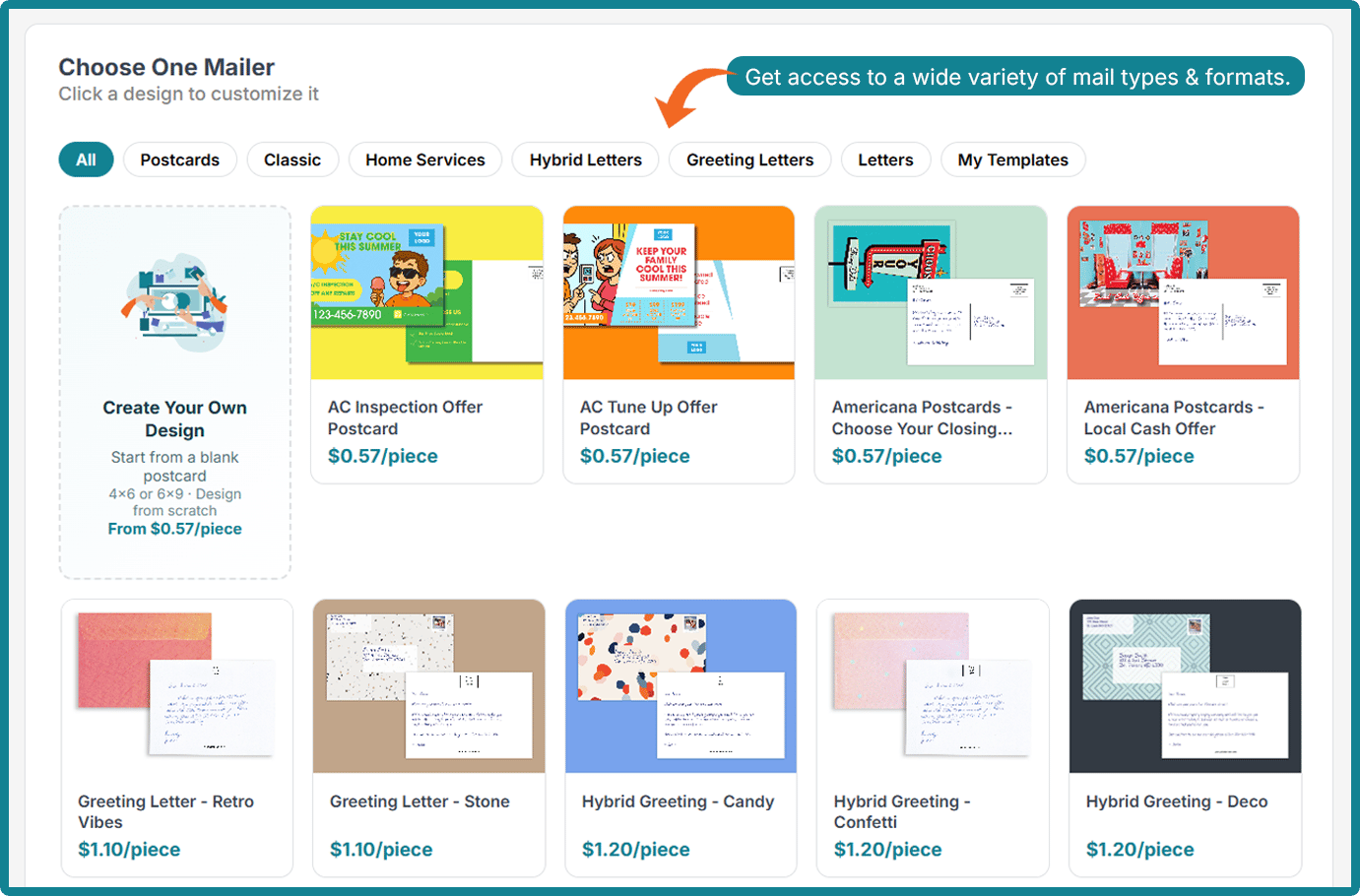
There is a library of mailer options, including various postcard and letter types. You can choose one design.
Note: The options range in cost, with postcards starting at 57 cents each and letters at 85 cents each. Some templates are customizable, while others have a fixed design.
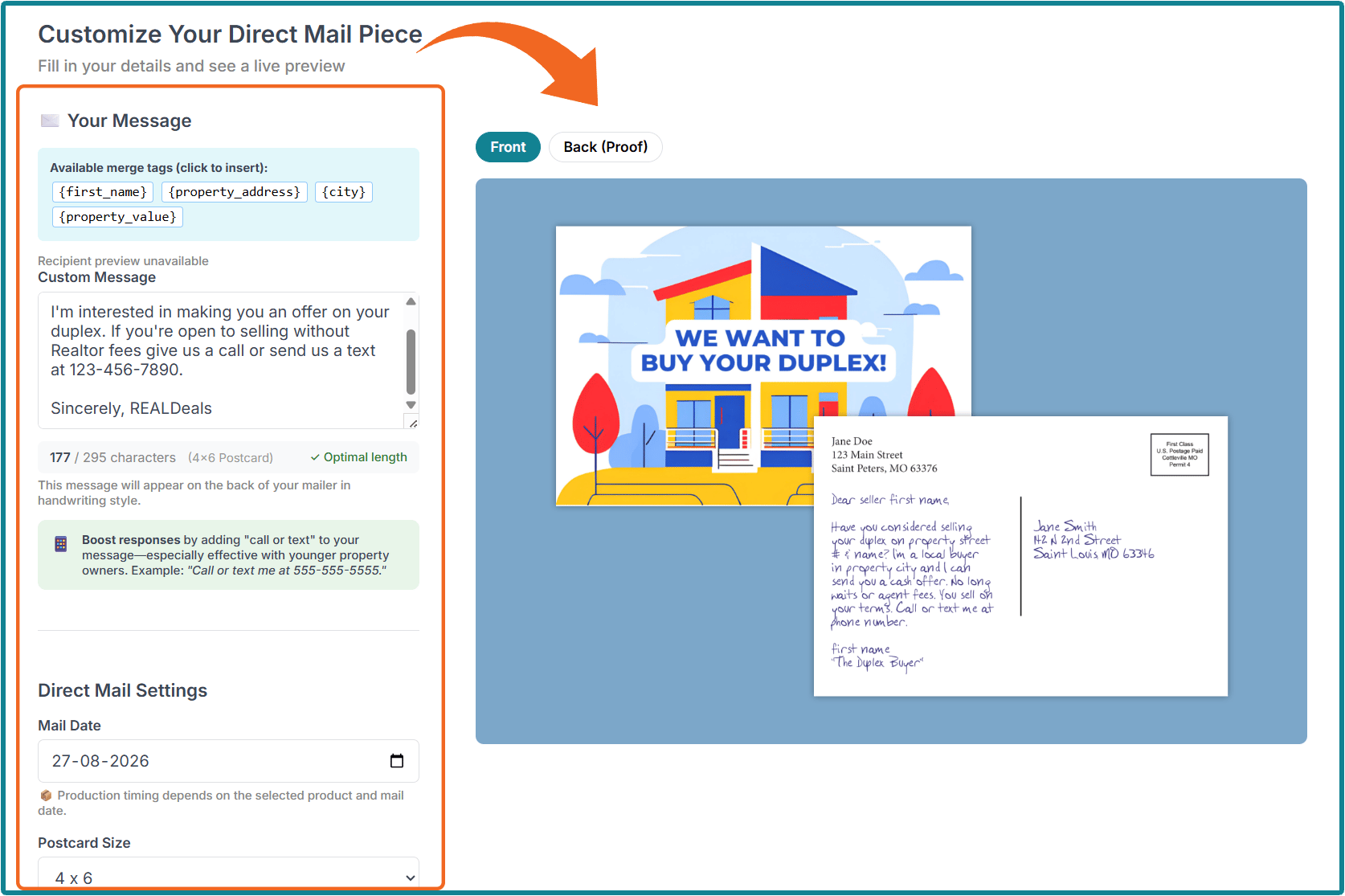
4. Customize Your Direct Mail Piece
|
This is where you will enter information like:
|
Note: The information you enter will vary depending on the type of direct mail you choose.
If the template is customizable, you can also customize it during this step.
After selecting your options for the mailer itself, you can also edit the list of leads you’d like your Single-Send campaign to be delivered to.
You will also be asked if you would like to save your direct mail design as a template. If you don’t want to use it again, you can continue without saving.
5. Review & Place Your Order
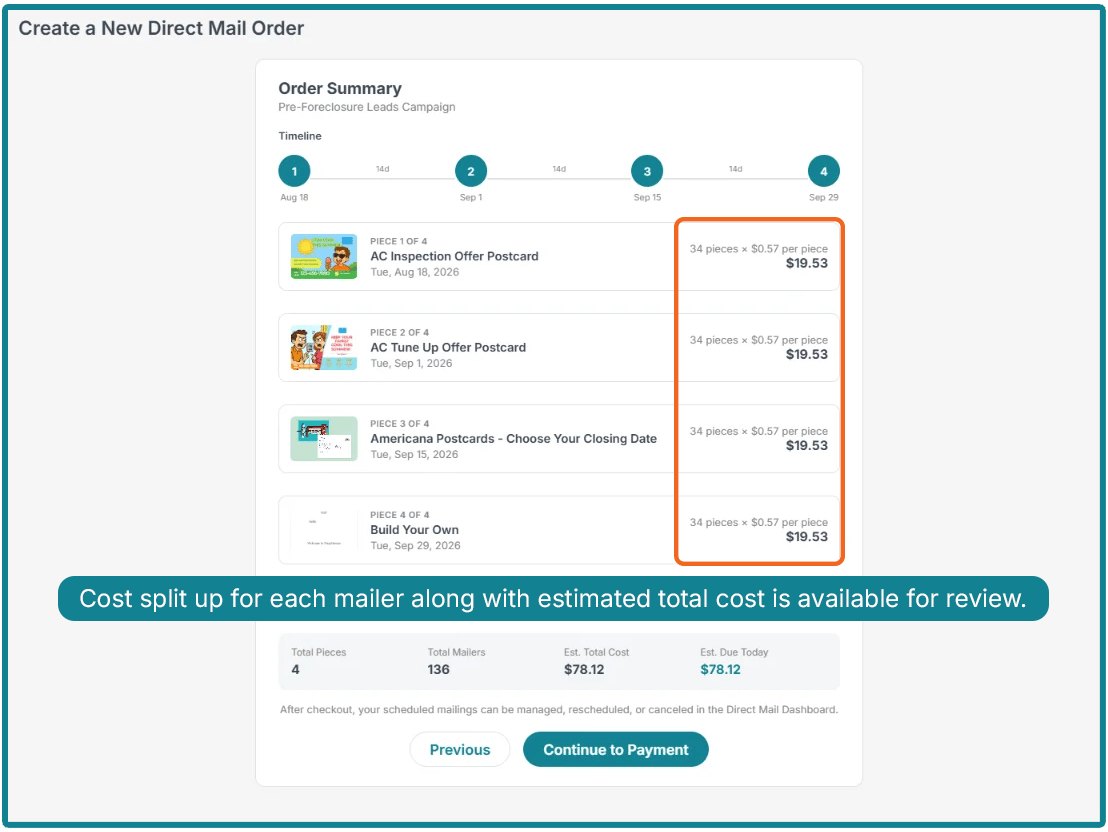
Lastly, you will see an order summary showing the total cost of your campaign.
|
The following information will be displayed in the summary:
|
If you’re satisfied with the order, you can click Continue to Payment. For a smoother checkout, it’s recommended that you use Prepaid Marketing Credits, as they are automatically applied and enable a quicker transaction.
However, you can also pay with a debit or credit card.
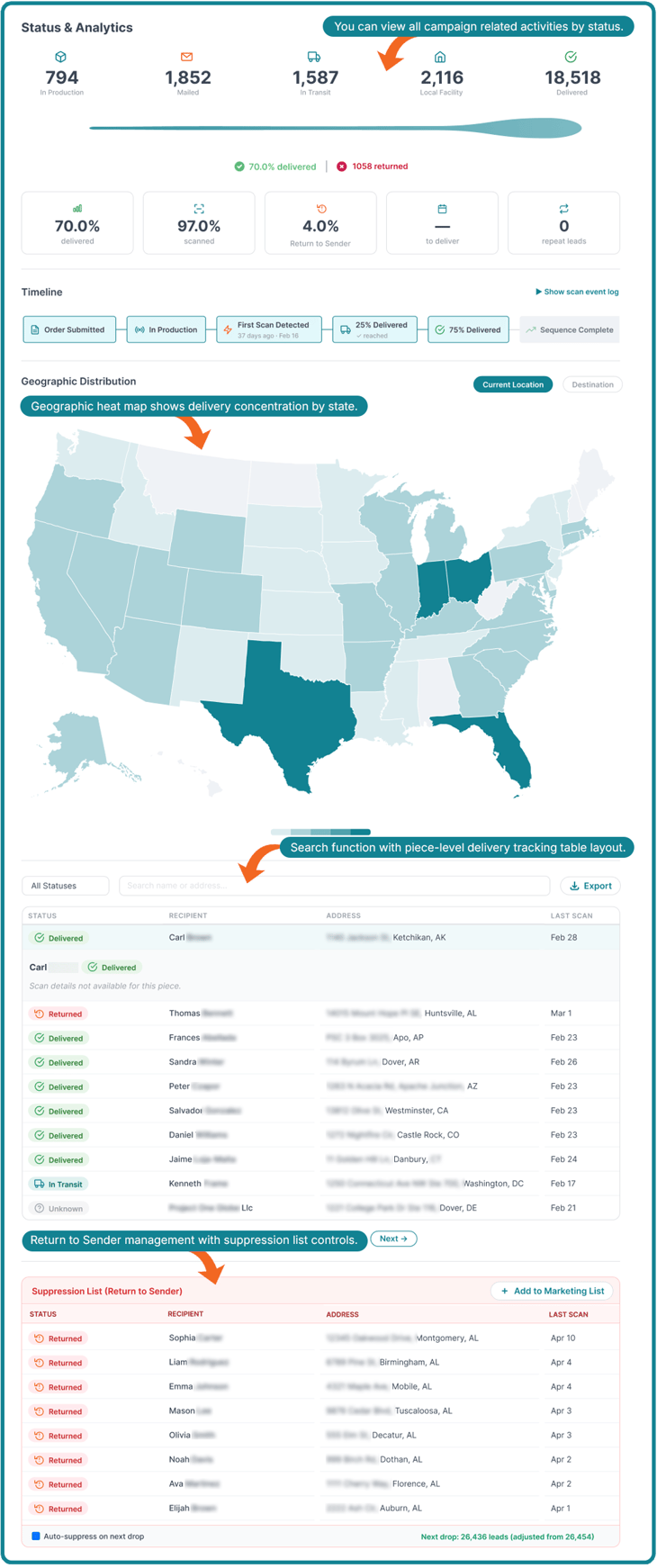
6. Monitor Your Campaign Via the Direct Mail Dashboard
|
After placing your Single-Send order, you can find everything you need to manage your campaigns in one place:
|
Note: Your physical mail will only be returned to you if you chose the first-class send option. If you choose standard mail, you can only see return-to-sender stats on the dashboard, and the physical mail will not be returned to you.
Benefits of Choosing Single Send
Multi Send
What It Is
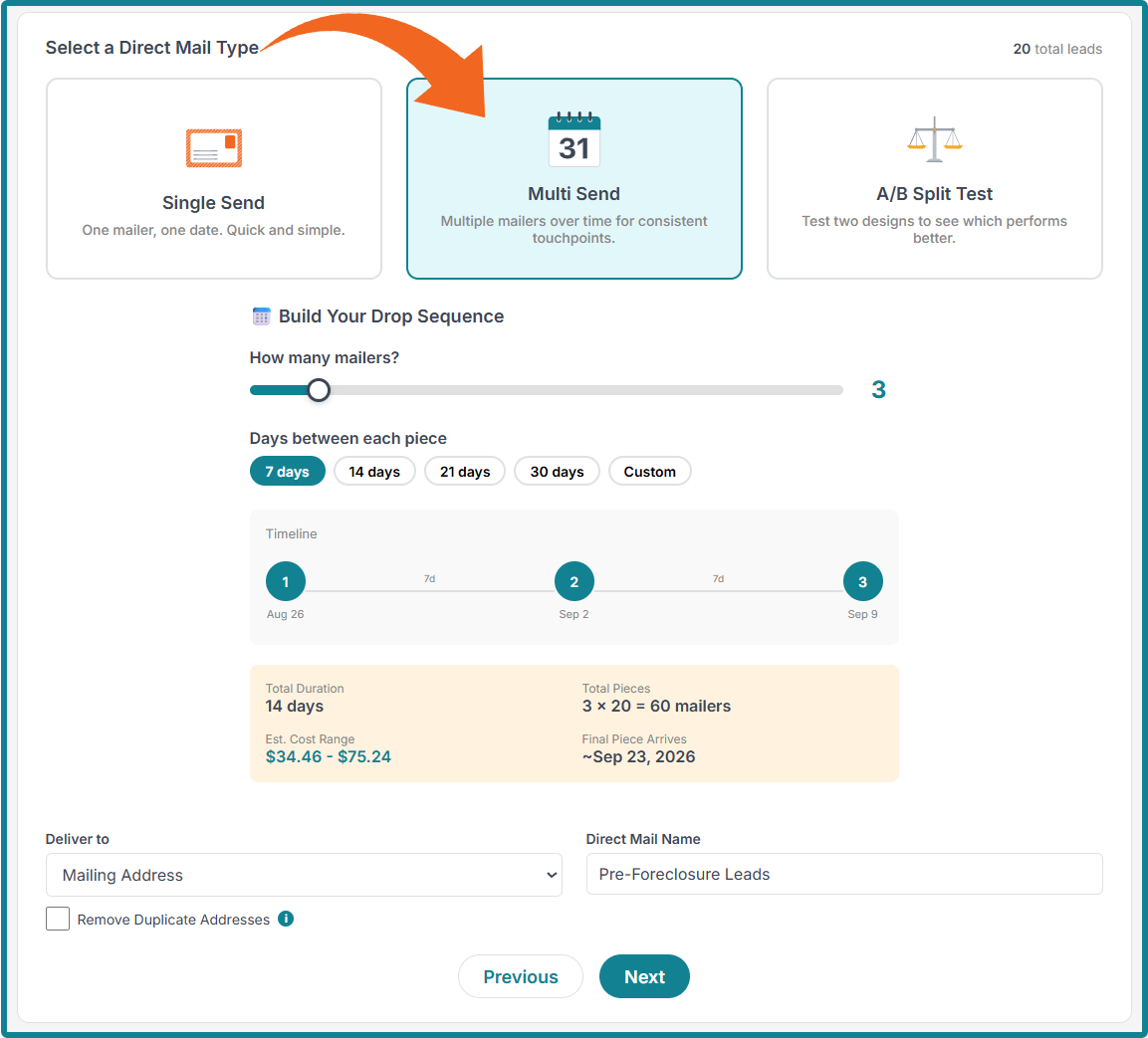
Multi Send is designed for campaigns that benefit from ongoing communication rather than a single interaction. Instead of sending one mail piece to your audience, Multi Send allows you to create a sequence of mailers that are delivered automatically over a defined period of time.
Each recipient progresses through the sequence in the order you set, receiving multiple touchpoints without requiring you to create and launch separate campaigns manually. This makes it easier to maintain consistent communication while saving time on campaign management.
How It Works
Creating a Multi Send campaign is similar to setting up a Single Send campaign, with the added ability to schedule multiple mail pieces within a single automated sequence.
1. Start a New Direct Mail Campaign
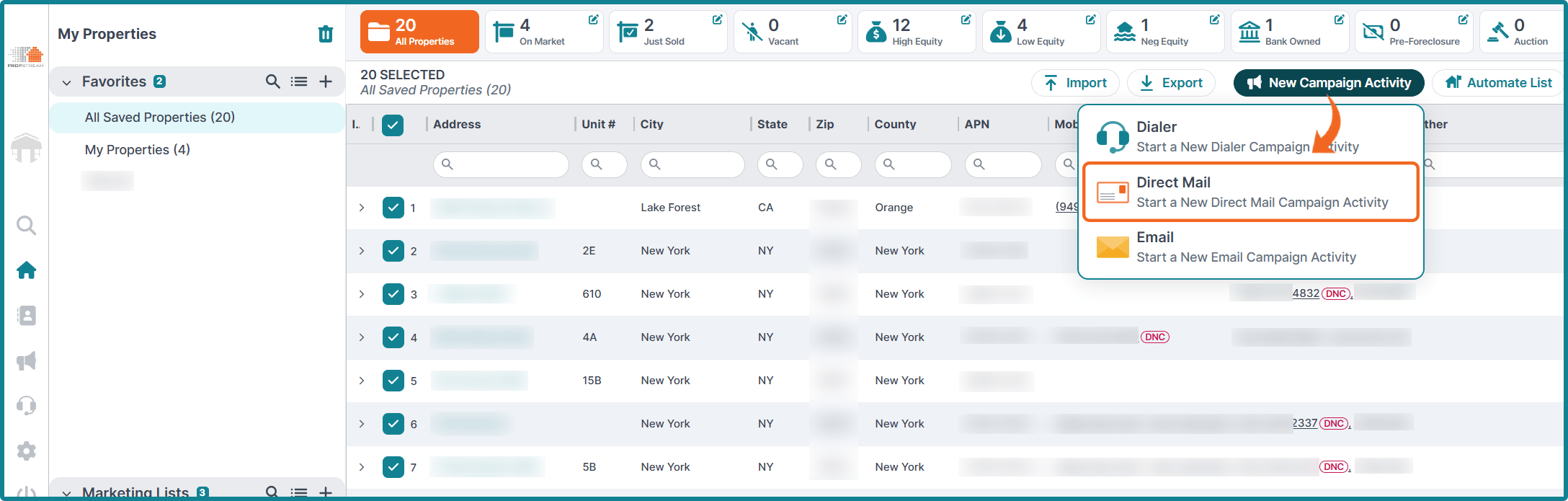
Start by navigating to the Campaigns section and clicking New Activity. Choose Direct Mail.
You can also start your campaign from the My Properties page. Select one or more properties, click New Campaign Activity, and choose Direct Mail.
2. Choose the Multi Send Option
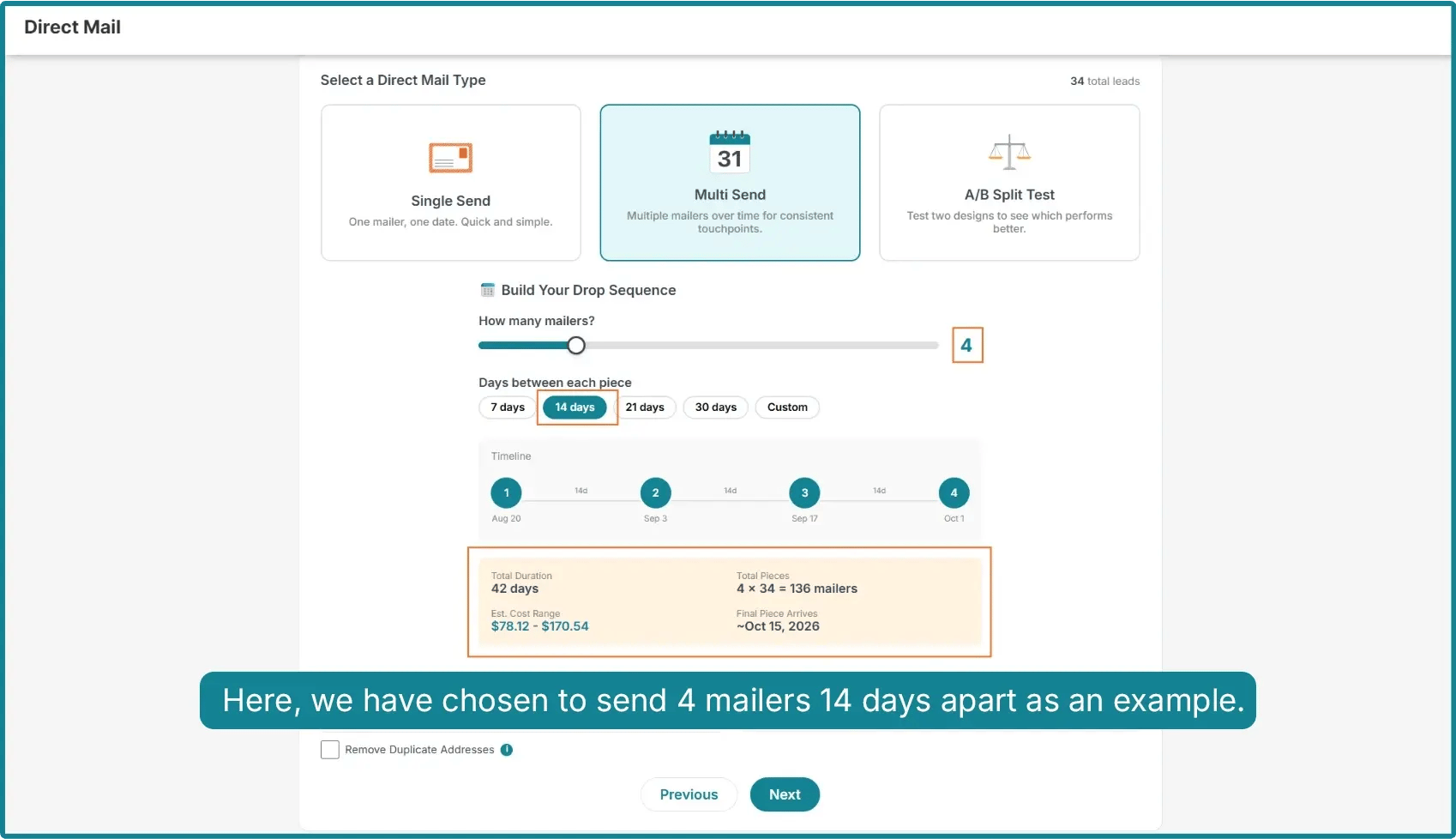
Under Select a Direct Mail Type, choose Multi Send.
|
Here, you can build your drop sequence and choose:
|
As with Single Send, you can choose whether to deliver to the Mailing Address, Property Address, or Both. You can also choose to Remove Duplicate Addresses.
Before continuing, you will assign a Direct Mail Name to the campaign.
4. Review an Order Summary & Customize Your Direct Mail Pieces
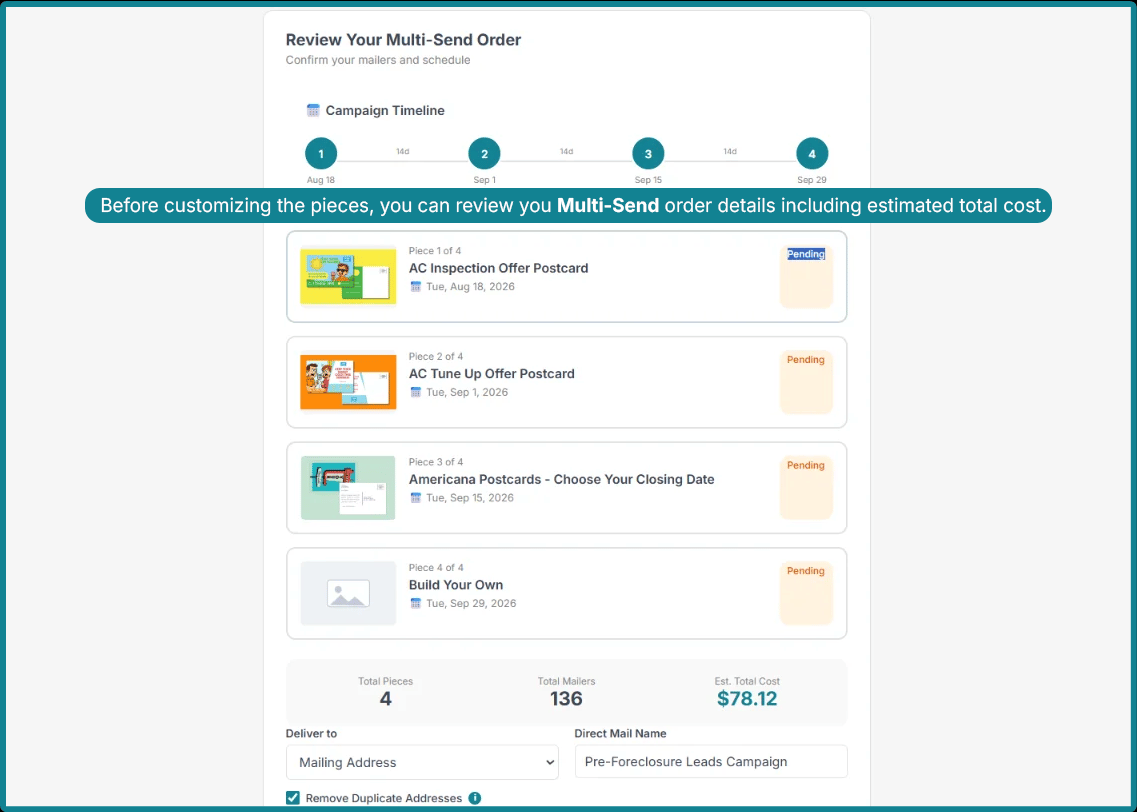
Where you designed one piece of direct mail with Single Send, you will design the number of mailers you chose to include in your sequence with Multi Send.
|
Before you continue to the customization step, you will see a summary displaying:
|
Once you’re satisfied with your order summary, you can continue to the customization step.
|
For each mailer, you will enter information like:
|
If the template is customizable, you can also customize it during this step.
After selecting your options for the mailer itself, you can also edit the list of leads you’d like your Multi-Send campaign to be delivered to.
You will also be asked if you would like to save your direct mail design as a template. If you don’t want to use it again, you can continue without saving.
Note: If you have not replaced or deleted the placeholder for your brand logo, you will be prompted to do so before you can continue to your order summary.
5. Review & Place Your Order
Lastly, you will see an order summary with a total cost for your Multi-Send campaign.
|
The following information will be displayed in the summary:
|
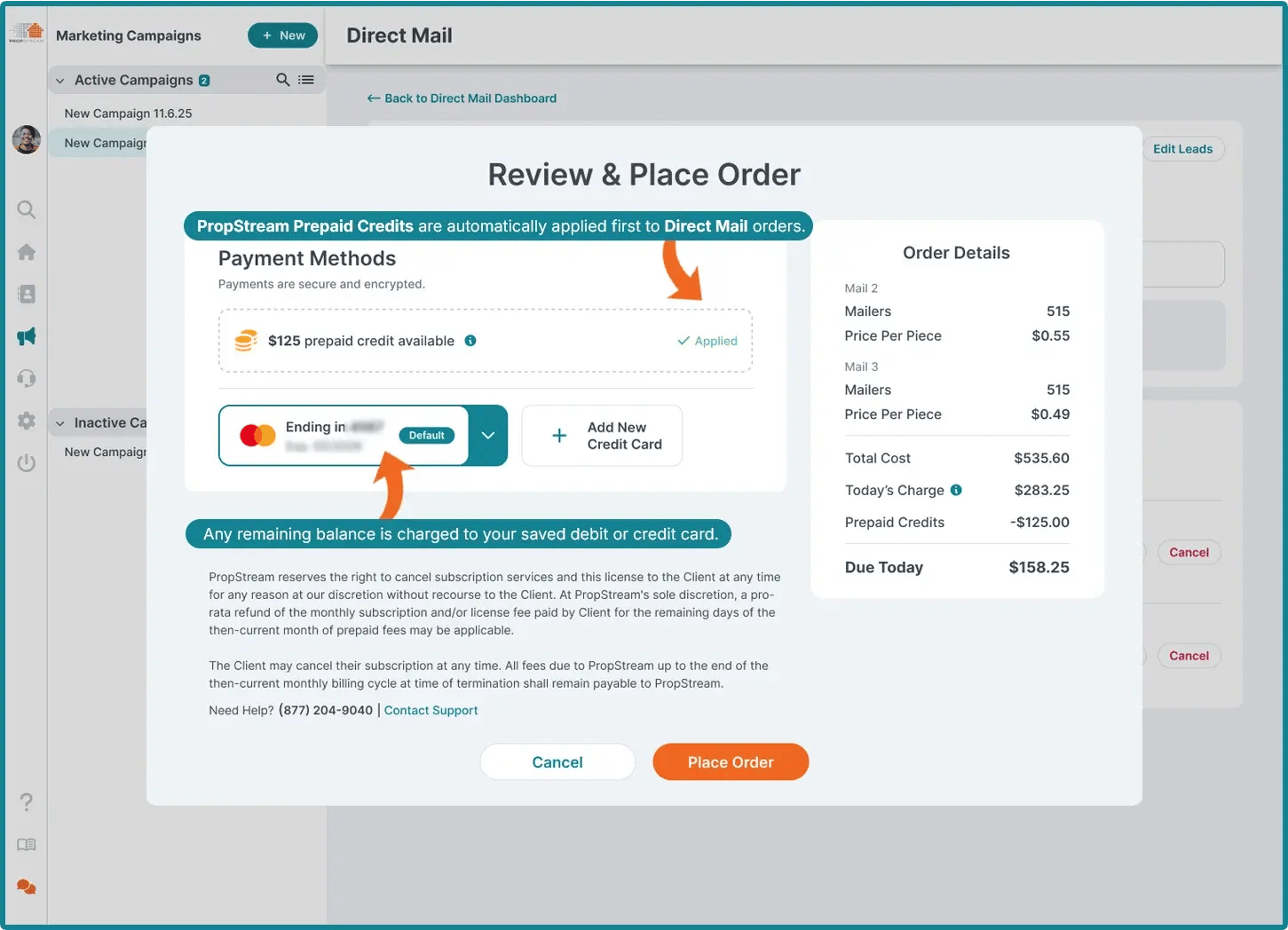
Click Continue to Payment once you are ready to complete your order. Using Prepaid Marketing Credits is highly recommended for a more streamlined checkout process, as they apply automatically and expedite the transaction.
Alternatively, payments can be made using a credit or debit card.
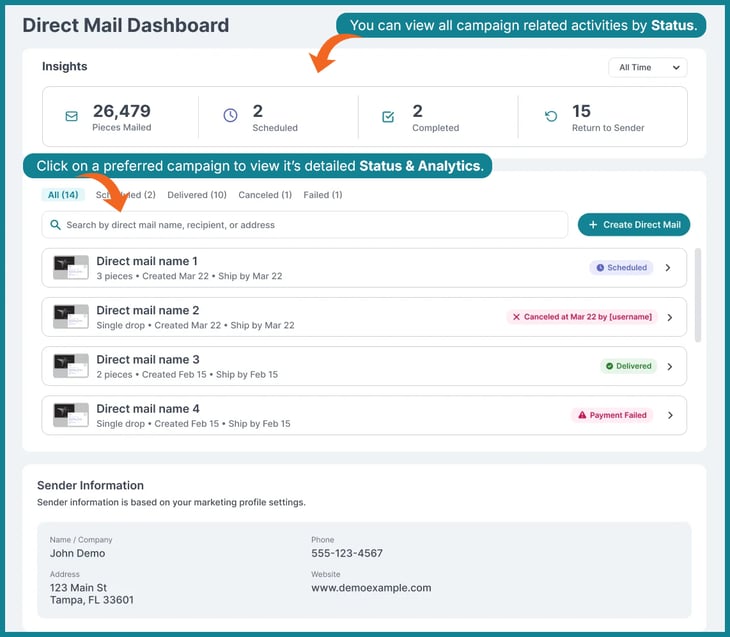
6. Monitor Your Campaign Via the Direct Mail Dashboard
|
After placing your Multi-Send order, you can find everything you need to manage your campaigns in one place:
|
Benefits of Using Multi Send
Multi-Send Best Practices
A successful Multi Send campaign is about more than sending multiple mail pieces—it's about delivering the right message at the right time.
- Space Mailings Appropriately: Choose intervals that make sense for your audience and campaign goals. Shorter gaps may work well for time-sensitive promotions, while longer intervals can be more appropriate for nurturing campaigns with extended sales cycles.
- Build Your Message Over Time: Treat your campaign like a conversation, not a repeated message. Each mail piece should build on the previous one by introducing new information, reinforcing your value, addressing common objections, or presenting a different reason to take action.
- Keep Your Branding Consistent: Even if each mail piece features different messaging, maintain consistent branding throughout the sequence. Using the same logo, colors, fonts, and overall visual style helps reinforce brand recognition and creates a cohesive experience for recipients.
A/B Split Test
What It Is
A/B Split Testing allows you to compare two variations of a direct mail campaign to determine which one performs better. Instead of sending the same mail piece to your entire audience, your recipient list is divided into two groups. One group receives Variant A, while the other receives Variant B.
By measuring the performance of each variation, you can gain valuable insights into what resonates most with your audience, providing real-world data to help you refine your marketing strategy and improve future campaigns.
|
There are many elements you can test, including:
|
Even small changes can influence how recipients respond, making A/B testing one of the most effective ways to optimize your direct mail efforts over time.
Note: While A/B Split Tests only require a minimum of 2 recipients, the most effective results are typically achieved with campaigns of 300 to 500 sends.
How It Works
Step 1: Start a New Direct Mail Campaign
Start by navigating to the Campaigns section and clicking New Activity. Choose Direct Mail.
You can also start your campaign from the My Properties page. Select one or more properties, click New Campaign Activity, and choose Direct Mail.
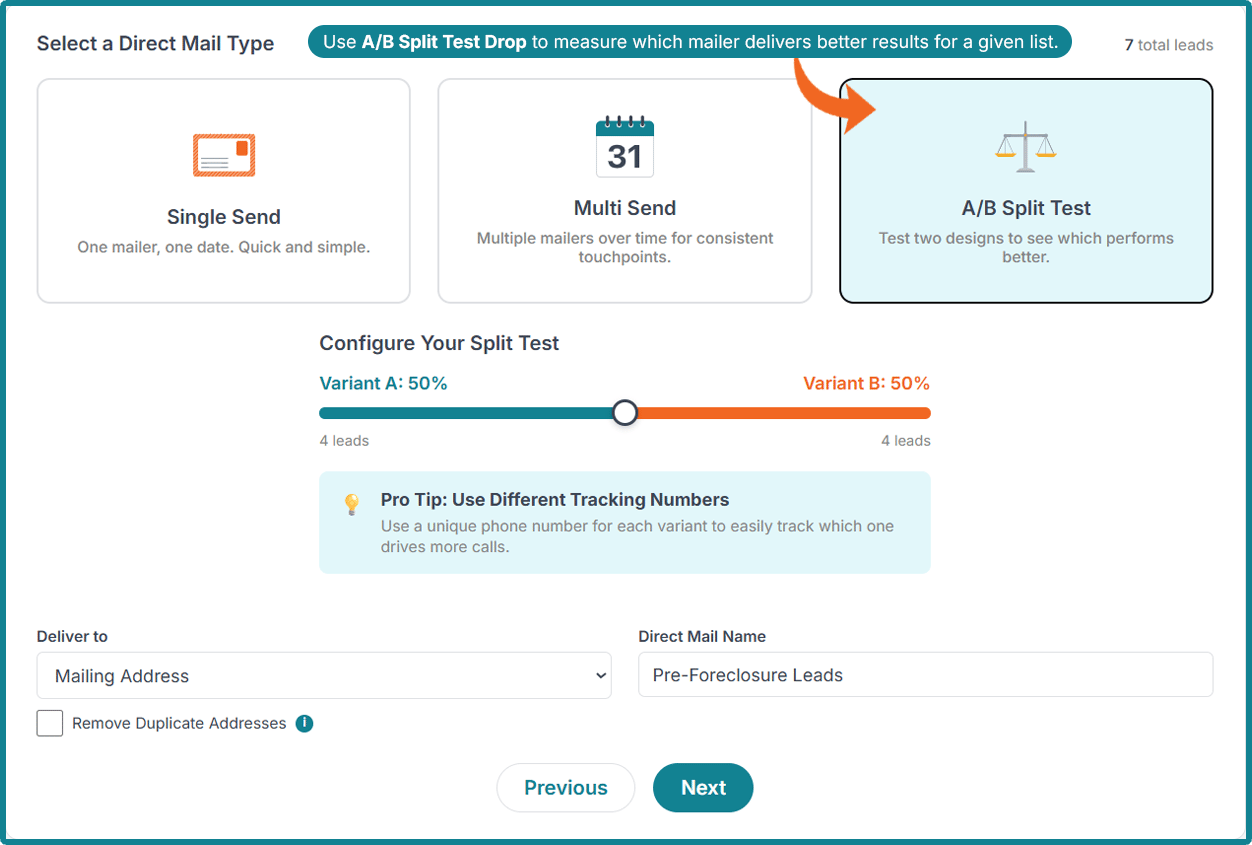
2. Choose the A/B Split Test Option
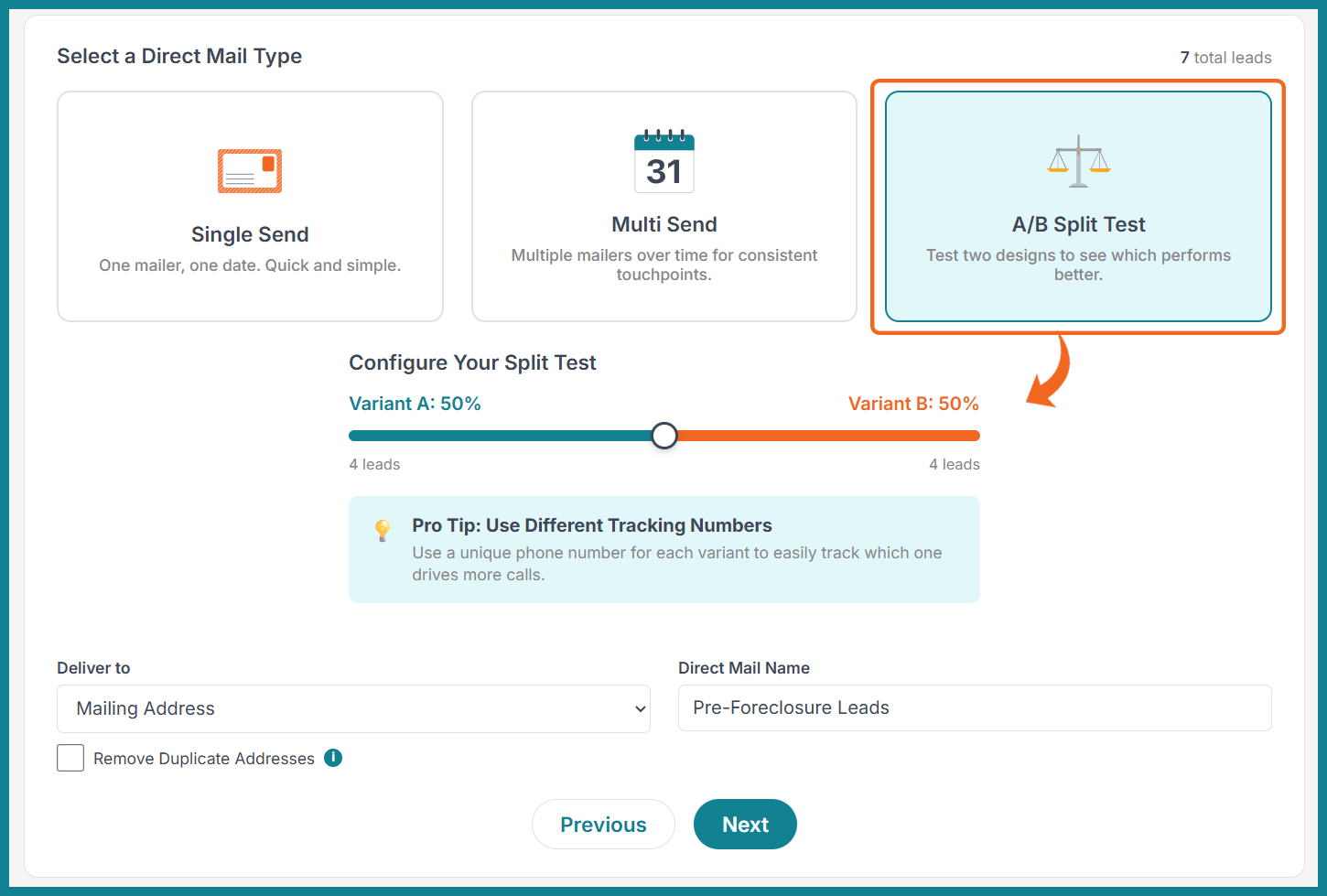
Under Select a Direct Mail Type, choose A/B Split Test.
In this section, you can set up your split test by determining the proportion of prospects assigned to Variant A and Variant B, and name your Direct Mail. You can choose whether to deliver to the Mailing Address, Property Address, or Both. You can also choose to Remove Duplicate Addresses.
3. Choose Your Mailers & Customize
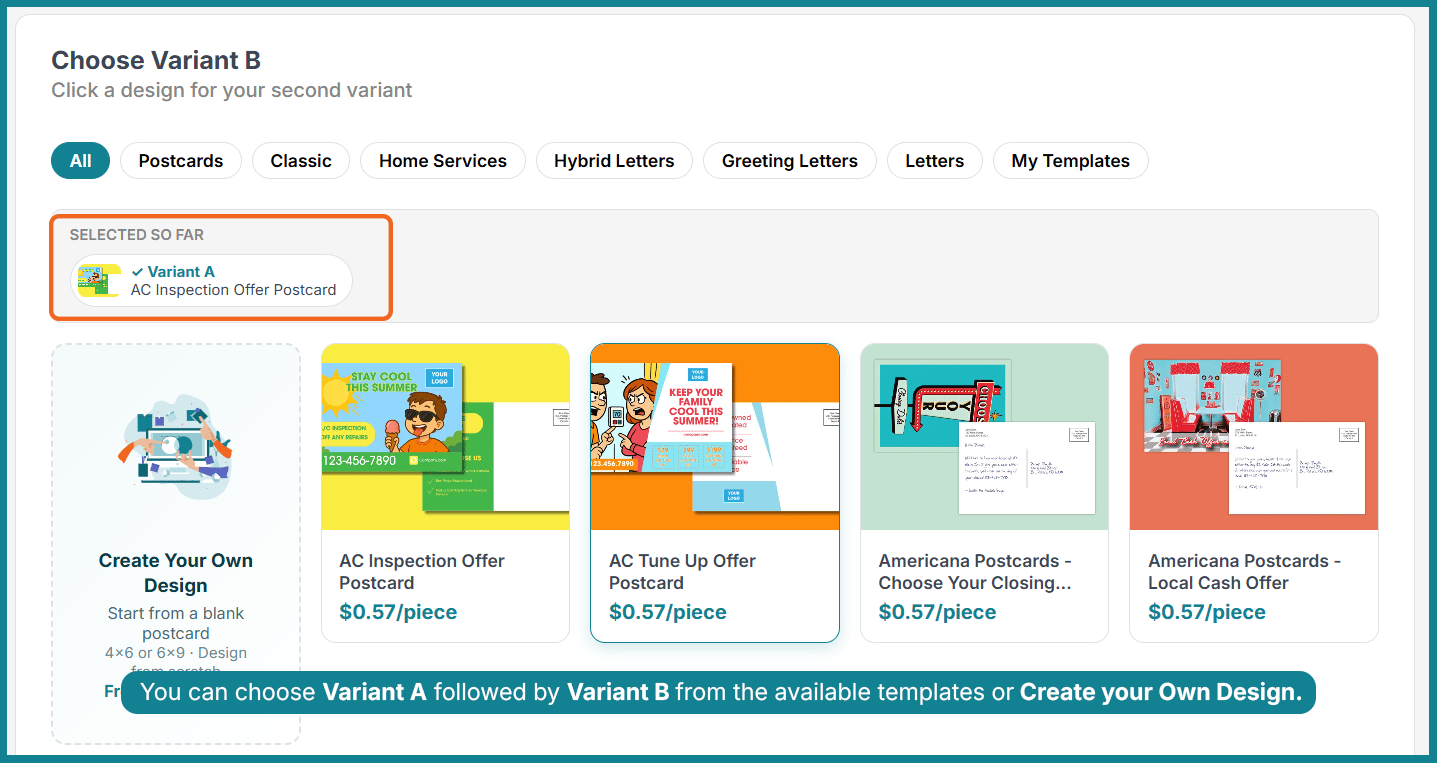
During this step, you will choose a mailer for Variant A and Variant B. You will be prompted again to adjust the percentage of mail sent to Variant A vs. B.
|
Next, you will enter the customization step. For each variant, you will enter information like:
|
If the template is customizable, you can customize it during this step. You can also edit your leads if needed.
Pro Tip: For the most precise results when conducting A/B Split Tests, we suggest altering only a single aspect while keeping both variants virtually identical. For instance, Variant A could use one image but share the exact same text as Variant B, which displays a different image. Alternatively, you might keep the visual design identical for both variants but vary the messaging. This strategy enables you to pinpoint the specific direct mail components that influence your results.
4. Review & Place Your Order
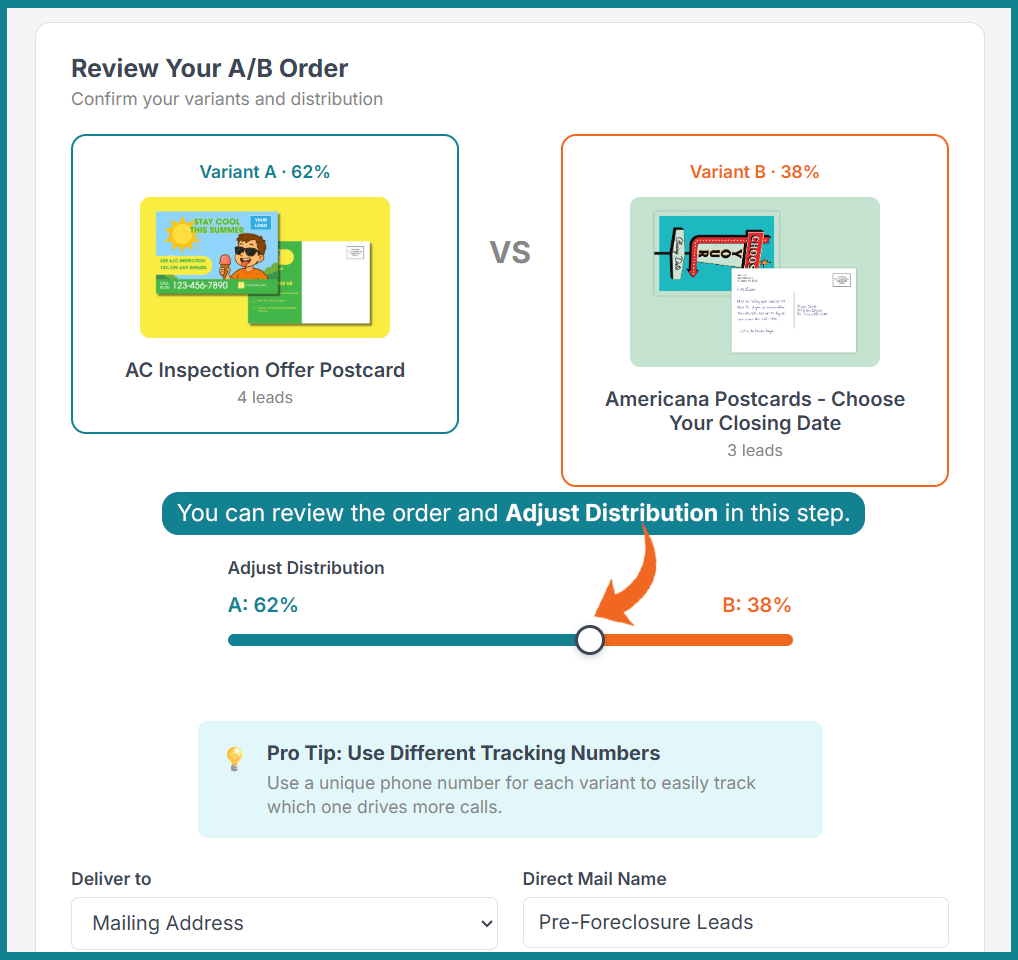
Lastly, you will see an order summary showing the total cost of your A/B Split Test.
|
The following information will be displayed in the summary:
|
Click Continue to Payment once you are ready to complete your order. Using Prepaid Marketing Credits is highly recommended for a more streamlined checkout process, as they apply automatically and expedite the transaction.
Alternatively, payments can be made using a credit or debit card.
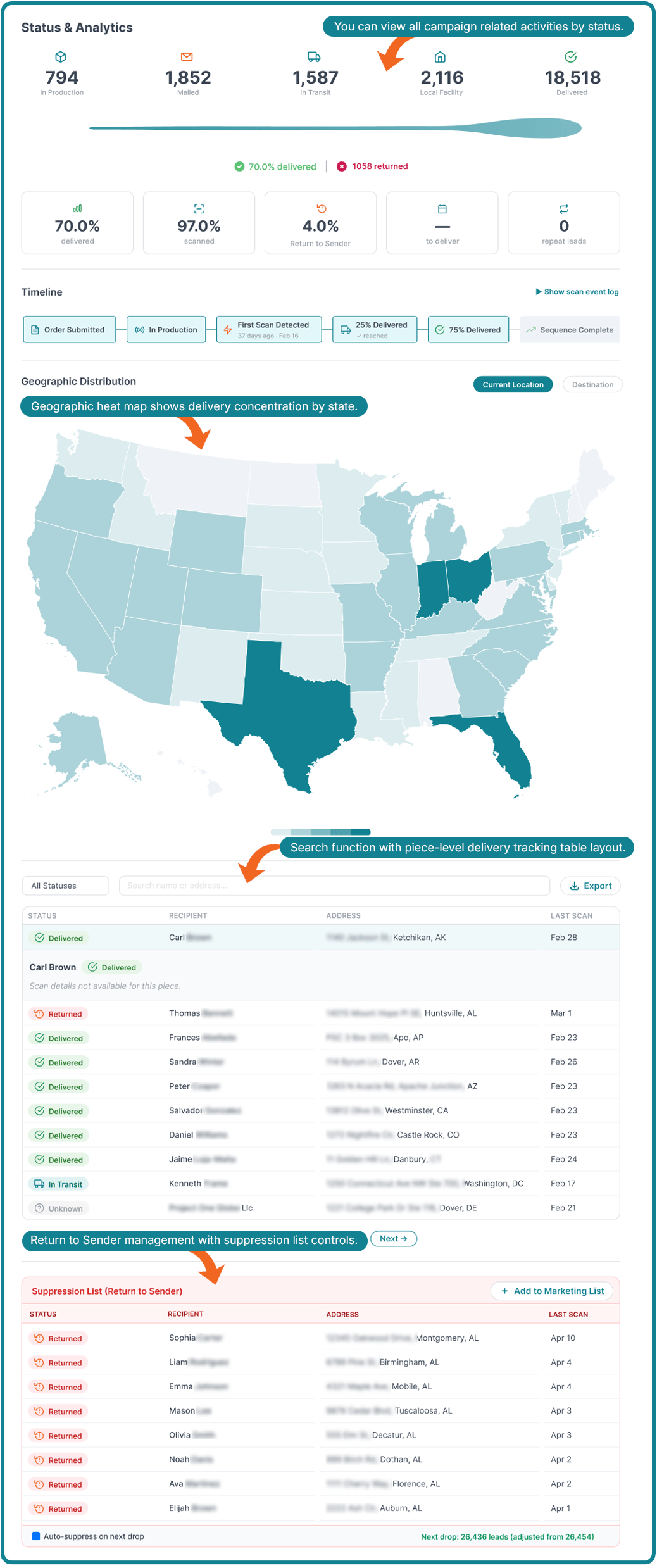
5. Monitor Your Campaign Via the Direct Mail Dashboard
|
After placing your A/B Split Test order, you can find everything you need to manage your campaigns in one place:
|
Benefits of Using A/B Split Tests
Best Practices for Performing an A/B Split Test
To get the most meaningful results from your A/B Split Tests, keep these ideas in mind:
- Test one variable at a time. This makes it easier to identify what influenced the outcome.
- Use comparable audience segments. Splitting similar recipients between both versions helps produce more reliable results.
- Give your campaign enough time. Allow sufficient time for recipients to receive, review, and respond before drawing conclusions.
- Document your findings. Keep a record of what you tested and the results so you can apply those learnings to future campaigns.
- Continue testing. Every campaign is an opportunity to learn. Even small improvements can lead to stronger long-term performance.
- Phone number variation. Use a unique phone number for each variant to easily track which one drives more calls.
Which Send Type Should You Choose?
| Goal | Recommended Send Type |
| Quick campaign | Single Send |
| Long-term follow-up | Multi Send |
| Improve campaign performance | A/B Split Test |
| Test messaging | A/B Split Test |
| Stay top-of-mind | Multi Send |
| One-time announcement | Single Send |
Start Your Direct Mail Marketing Campaign Today
Ready to elevate your direct mail strategy? Try PropStream Direct Mail's three send types to reach more prospects, streamline your outreach, and discover what works best for your business.
*PropStream engages an independent third-party to perform skip tracing.