

Aug 04, 2026 PropStream

PropStream’s New Direct Mail Experience—Connect, Track, & Grow

Release Highlights

  • Direct Mail in PropStream has been completely rebuilt with new mail formats, intelligent campaign types, real-time performance tracking, and an overall improved user experience, all at the lowest prices in the industry!
  • With multiple sizes, styles, and design options, users can now use PropStream to send:
    • Handwritten, printed, and hybrid letters
    • Custom designs
    • Postcards
    • Home services mailers
  • Sending options now include:
    • Single Send, Multi Send, A/B Split Test
  • Each send type includes its own performance dashboard, delivery tracking, and geographic heat maps.
  • With this all-in-one platform, users can launch, manage, and optimize campaigns without leaving PropStream.
  • Lowest prices in the industry with no minimum orders on single sends!

Direct mail remains one of the most effective ways to reach property owners—but creating, managing, and measuring campaigns can quickly become overwhelming when your tools don't work together.

We understand this pain point, which is why PropStream Direct Mail has been completely redesigned from the ground up! The new experience introduces a modern campaign workflow, a professional design studio, and a range of mail formats, giving real estate professionals everything they need to run high-impact outreach campaigns in one location.

Let’s explore everything this update has to offer: 


Jump to the section you need:


New and Improved Direct Mail Dashboard

New Direct Mail Dashboard - Blank
New and Improved Direct Mail Dashboard


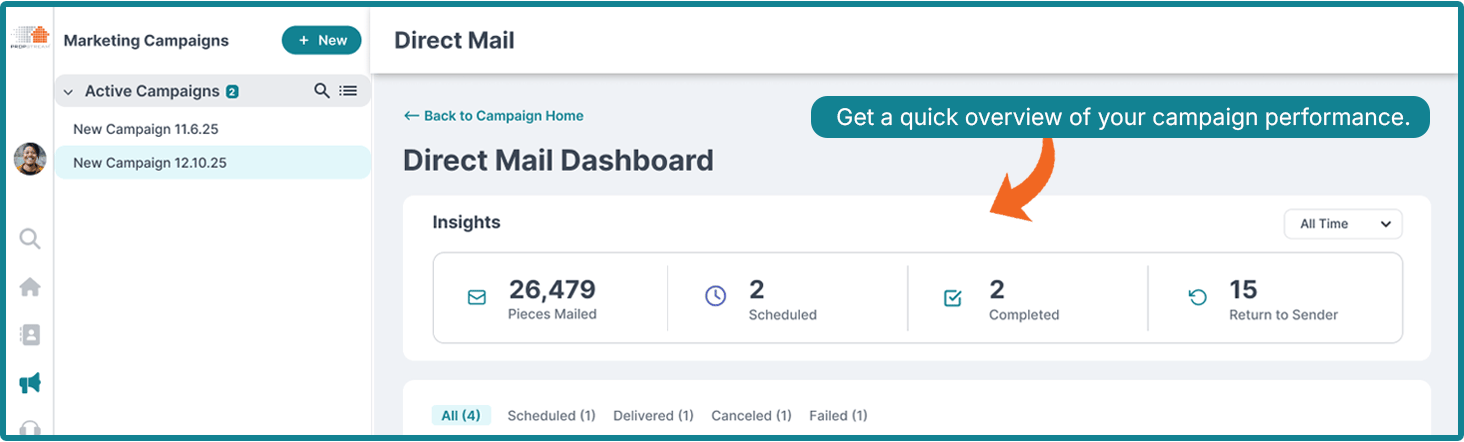
New direct mail options are only as good as your ability to see how they’re performing and adjust your campaigns according to the results.

The redesigned dashboard is the central hub for all campaign management and performance insights, like:

Performance Insights
Performance Insights - Direct Mail Dashboard in PropStream

Get a quick overview of your campaign performance with key mailing metrics, including: 

  • Pieces Mailed
  • Scheduled Mail Pieces
  • Completed Mailings
  • Returned to Sender (RTS)

There are also several filtering options to help you narrow down results within a particular timeframe.

Filter by: All Time, Past Week, Past Month, Past 3 Months, Past 6 Months, or Past 1 Year.

Activity Management

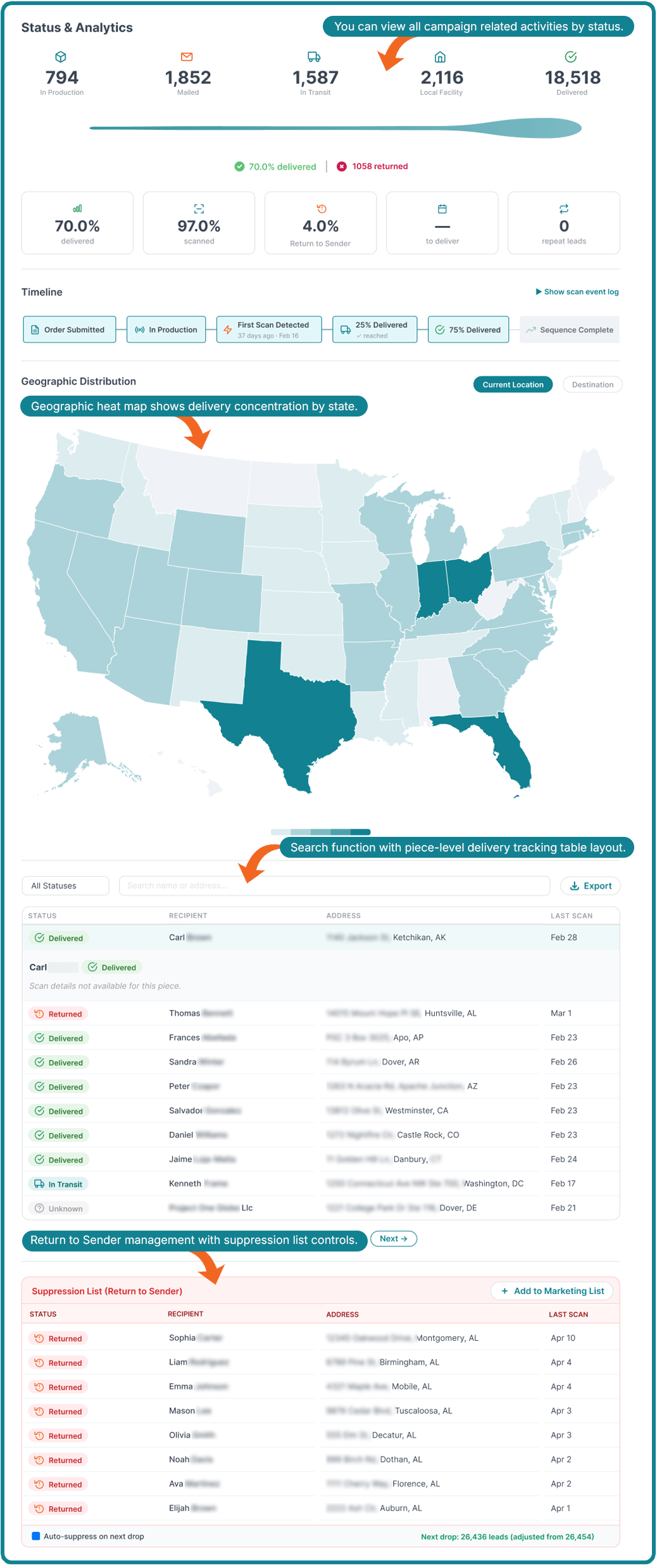
Activity Management- Status and Analytics Dashboard in Direct Mail


Everything you need to manage your campaigns in one place:

  • View all activities by status: All, Scheduled, Delivered, Canceled, Failed
  • Geographic heat map showing delivery concentration by state
  • Search by campaign name or property address
  • Piece-level delivery tracking table (Status, Recipient, Address, Last Scan Date)
  • Return to Sender management with suppression list controls
  • Toggle between Card View (default) and Table View

Timeline Tracking

Timeline view for tracking direct mail campaign progress

Each campaign tracks progress through six stages:

  1. Order Submitted
  2. In Production
  3. First Scan Detected
  4. 25% Delivered
  5. 75% Delivered
  6. Sequence Complete

Wider Variety of Mail Types & Formats
Propstream has a wide variety of direct mail types and formats

Direct Mail Sizing Cheat Sheet

  • 4x6: Postcards, Design Your Own, Greeting Letter, Home Services, Classic
  • 6x9: Postcards, Design Your Own, Greeting Letter, Home Services, Classic
  • 5x7: Greeting Letters, Hybrid Letters
  • 8.5x11: Standard Folded Letters

Pro Tip: There are two entry points for starting your Direct Mail Campaign:

  1.  From the Campaign Dashboard — click New Activity and select Direct Mail.

  2. From My Properties — select one or more properties, click New Campaign Activity, and choose Direct Mail.


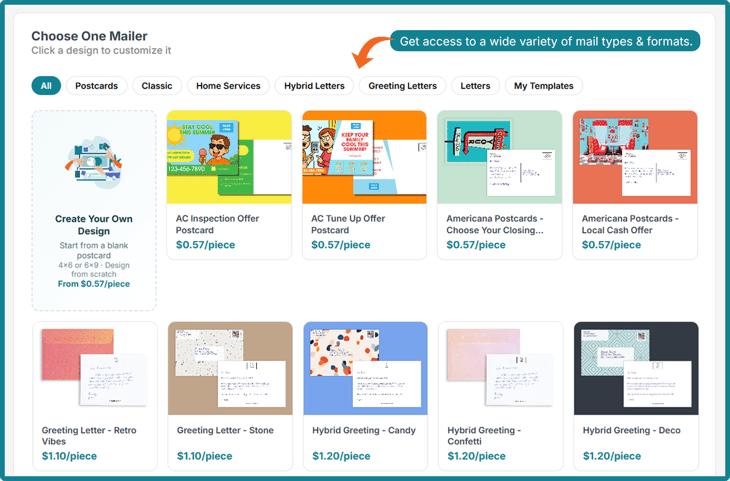
Every real estate professional has their own unique brand voice, clientele, and marketing preferences, which is why we’ve updated our direct mail offering to include a wide variety of mail types and formats, including:

Postcards

Postcards - Front
Postcards Backside


Postcards are fully customizable via the design editor, putting the power of persuasion back in your hands. You can choose from 4x6 or 6x9 sizes.

Home Services Postcards

Home Service Post Cards
Home Service Post Card Sample


Offering roof repair? Pool maintenance? Lawn services? Our home services mail type is the perfect option for your outreach campaign and is available in 4x6 or 6x9 sizes.

Design Your Own

To unleash your inner artist, our design-your-own mail type lets you start from a blank canvas and create a personalized postcard from scratch using a built-in, intuitive design studio. For standard postcards, you can choose from 4x6 or 6x9 sizes.

Meet Our New Direct Mail Design Studio

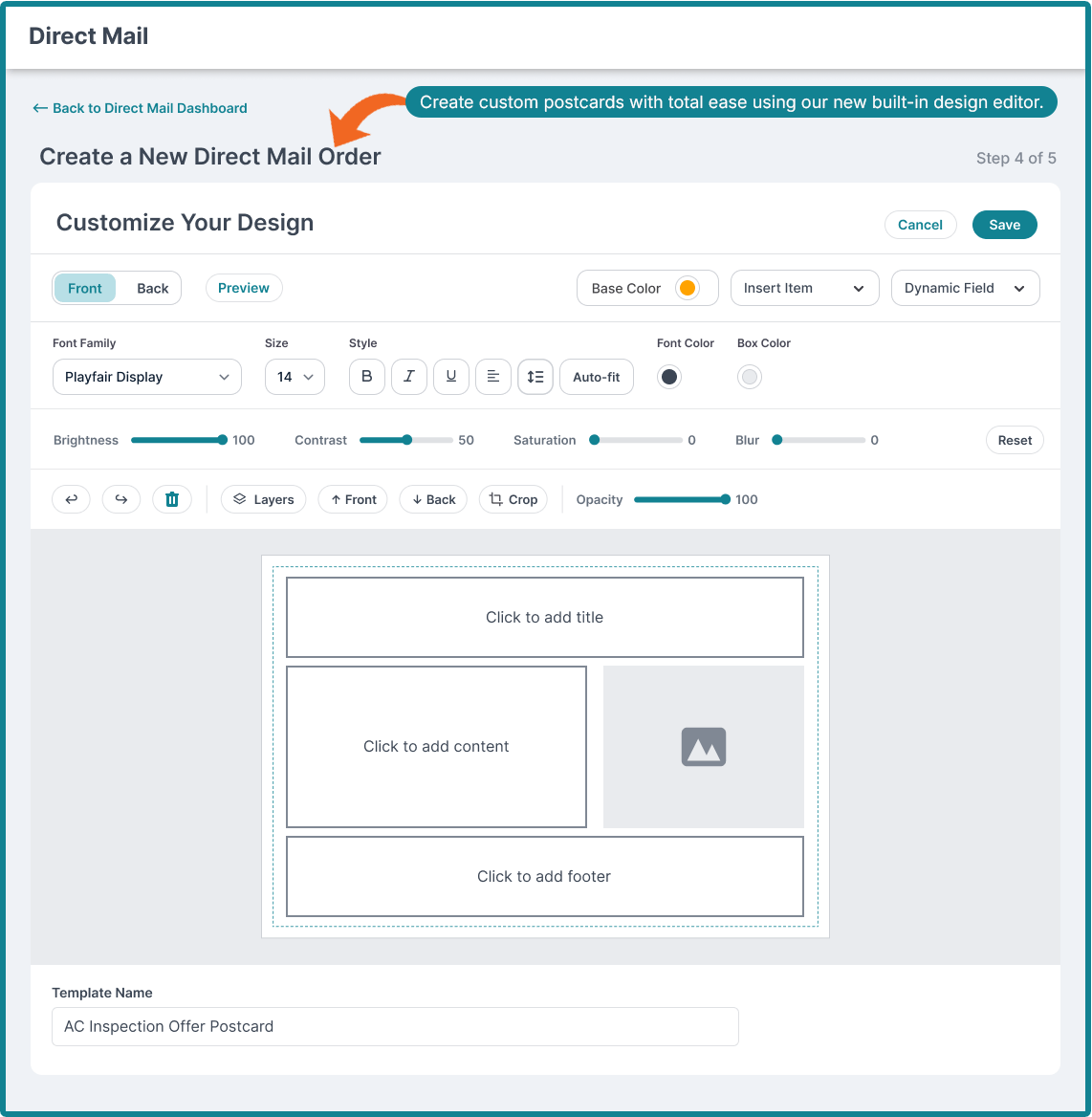
Meet Our New Direct Mail Design Studio

Our new and improved built-in design editor gives users full control over their postcard creative with:

  • A drag-and-drop canvas with front and back postcard views
  • Text editing to customize font, size, color, weight, style, and alignment controls
  • The ability to insert images, logos, icons, shapes, dividers, and other decorative elements
  • Dynamic merge fields (Owner Name, Property Address, City, ZIP, Phone, etc.)
  • Layer management with visibility toggle
  • The option to save designs as reusable templates or as a one-time design (reusable templates will be stored in your gallery)
  • Undo/redo history within the session

Standard Folded Letter

Standard checque-sized mailer
standard mailer 2


When you need to convey a high level of professionalism or maintain a formal tone, our printed cheque-sized letters provide the polished appearance required for sophisticated direct mail campaigns. Available in 8.5x11 sizing.

Greeting Letter

Greeting Letter Front
Greeting letter - insert
Greeting letter- envelope

Pro Tip: The greeting letter resembles our postcard format. However, both the handwritten envelope and the letter add a personalized touch.


For a touch of warmth, our greeting letters are an excellent choice for relationship-based outreach. Secured in a handwritten-style envelope with a handwritten-style label, it is available in size 5x7.


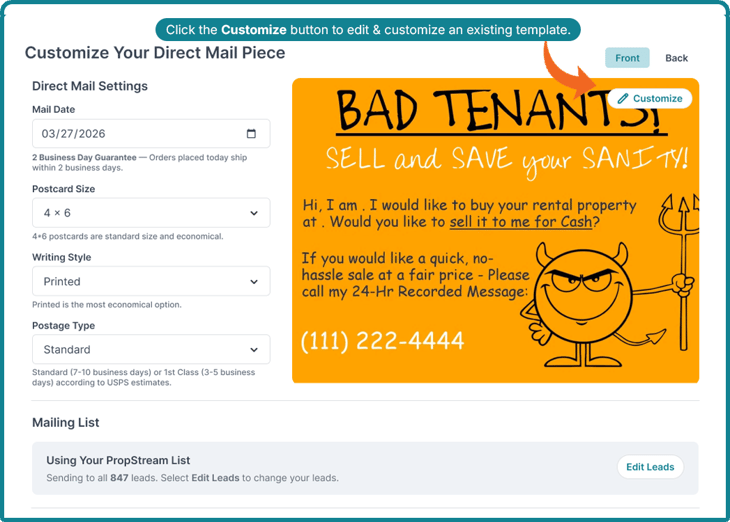
Not sure whether your direct mail piece is customizable? Look for the Customize button in the top right corner of the design!
Customize Button - Customize existing templates


Hybrid Letters

Greeting letter front
Hybrid letter - insert
Hybrid letter Envelope


Stuck between print and handwritten? Try our new hybrid letters! Using a mixture of printed and handwritten elements (printed envelope with a handwritten insert), the hybrid format creates a distinctive, personal feel. It is available in a 5x7 size.

Classic

Classic style Postcards Front
Classic style postcards - back


For users who know what they like and want to stick to the basics, we offer our previous postcard designs, which remain fully editable.


A Note to Our Existing Users: The new Direct Mail experience is a complete redesign, so your previously created custom templates are not carried over to support a more streamlined and intuitive campaign creation experience.


How Does Pricing Vary for Each Type/Format?

For the initial launch, PropStream is offering special discounted rates with no minimum orders*!

Mail Type Standard Class (Starting At) First-Class (Starting At)
Postcards $0.57 each $0.59 each
Letters $0.85 each $1.25 each

Customers can send postcards for as low as 57¢ each and letters for 85¢ each using standard class. First-class mail can be sent for as low as 59¢ per postcard and $1.25 per letter.

For more in-depth pricing and quotes for your preferred direct mail type and send, log in to your PropStream account.

Note: For a limited time, the new discounted pricing, which is normally reserved for the PropStream Connect add-on (or the Pro and Elite Plans), is available to all PropStream users.

This limited-time offer gives every user the opportunity to explore greater product variety, improved print quality, and tracking and campaign management at PropStream Connect’s low price point—the best in the industry.

If you’re not a PropStream Connect user (or on the Pro or Elite Plan), be sure to take advantage of this offer while it lasts!


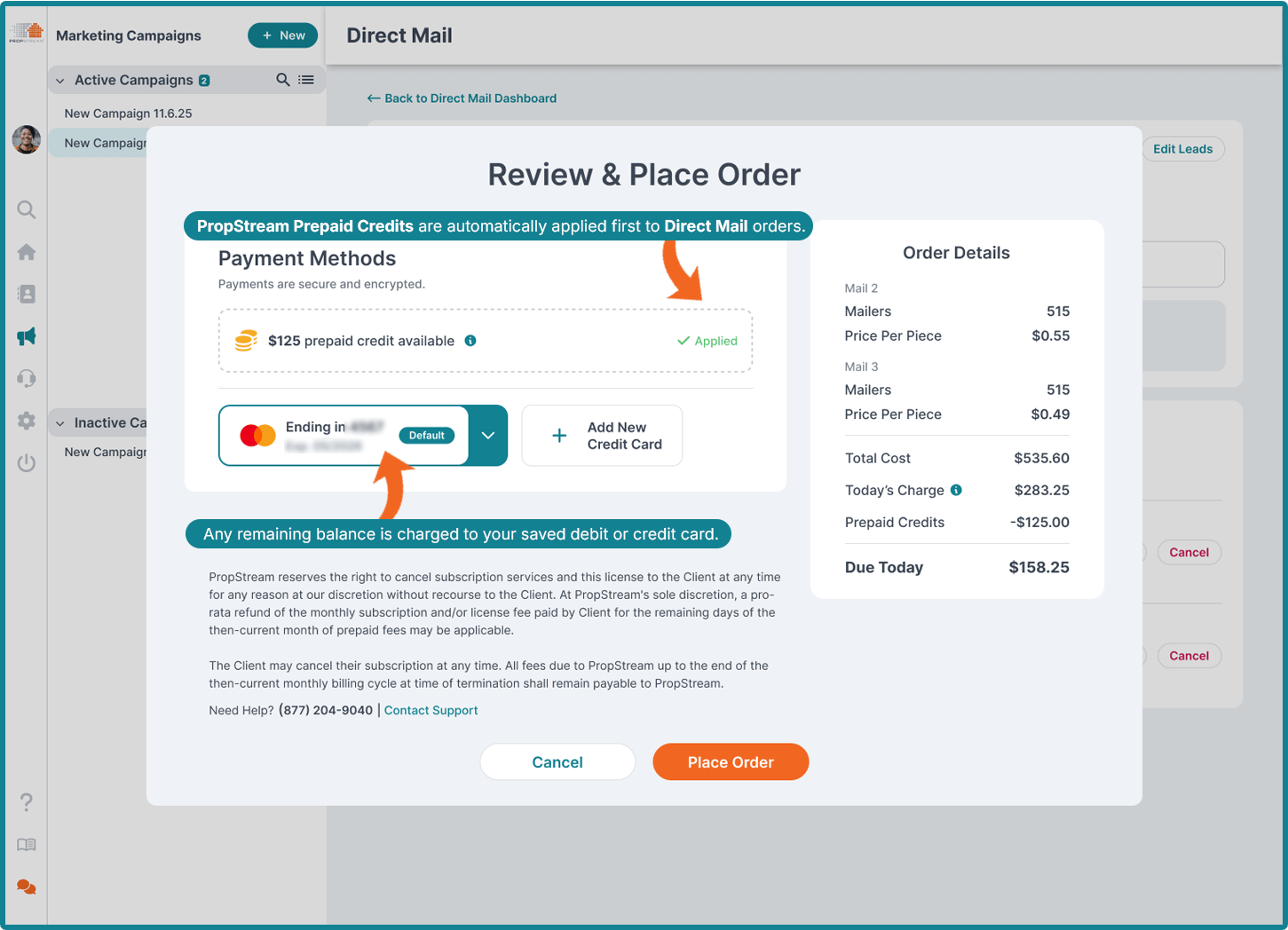
Pro Tip: For customers using the single-send function or creating small-batch sends, we recommend using PropStream Marketing Prepaid Credits for a more streamlined transaction experience—as they are automatically applied before your card is charged. 


Return to Sender Benefits 

With PropStream, both Standard Mail and First-Class Mail support Return to Sender tracking through custom coding and the Intelligent Mail barcode (IMb).

For Standard Mail, users can view Return to Sender data directly in their dashboard to monitor undeliverable pieces. If you need the physical mail piece returned when it can't be delivered, however, you'll need to choose First-Class Mail.

Standard Mail also no longer requires large minimum mailing volumes, making it a cost-effective option for smaller campaigns. For users who don't need expedited delivery or the physical return of undeliverable mail, Standard Mail offers an affordable way to reach prospects while still providing delivery insights.

Feature Standard Mail First-Class Mail
Delivery Speed Slower Faster
Cost Lower Higher
Return to Sender (Physical Mail) Unavailable Available
Return to Sender Stats Available Available
Large Minimum Order Required* No No
Automatic Forwarding No Yes
Best for Cost-conscious campaigns without urgent delivery needs Time-sensitive campaigns


Return to Sender means an undeliverable mail piece is sent back because the address is incorrect, the recipient has moved, or another delivery issue occurred.

*Please note that A/B testing direct mail requires a minimum of two sends for this drop feature to work (see more below).


New Intelligent Campaign Types: Single Send, Multi Send, A/B Split Test

Whether you want to send a quick, one-off direct mail piece, launch a full-scale campaign, or test your results, PropStream’s new Direct Mail platform has you covered with additional campaign types.

Single Send Drop
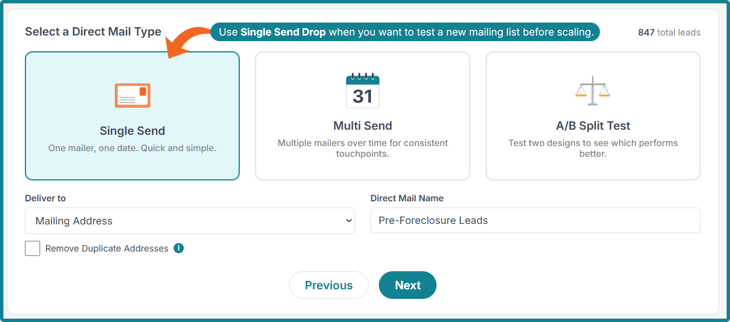
Single send drop - Direct Mail type

Single Send Drop allows users to send a one-time mailer to a selected list. This option is excellent for testing a new list without investing in a large-scale direct-mail marketing campaign. 


Note: Single Send Drops are charged immediately after order submission and require at least 1 recipient.


Multi Send Drop
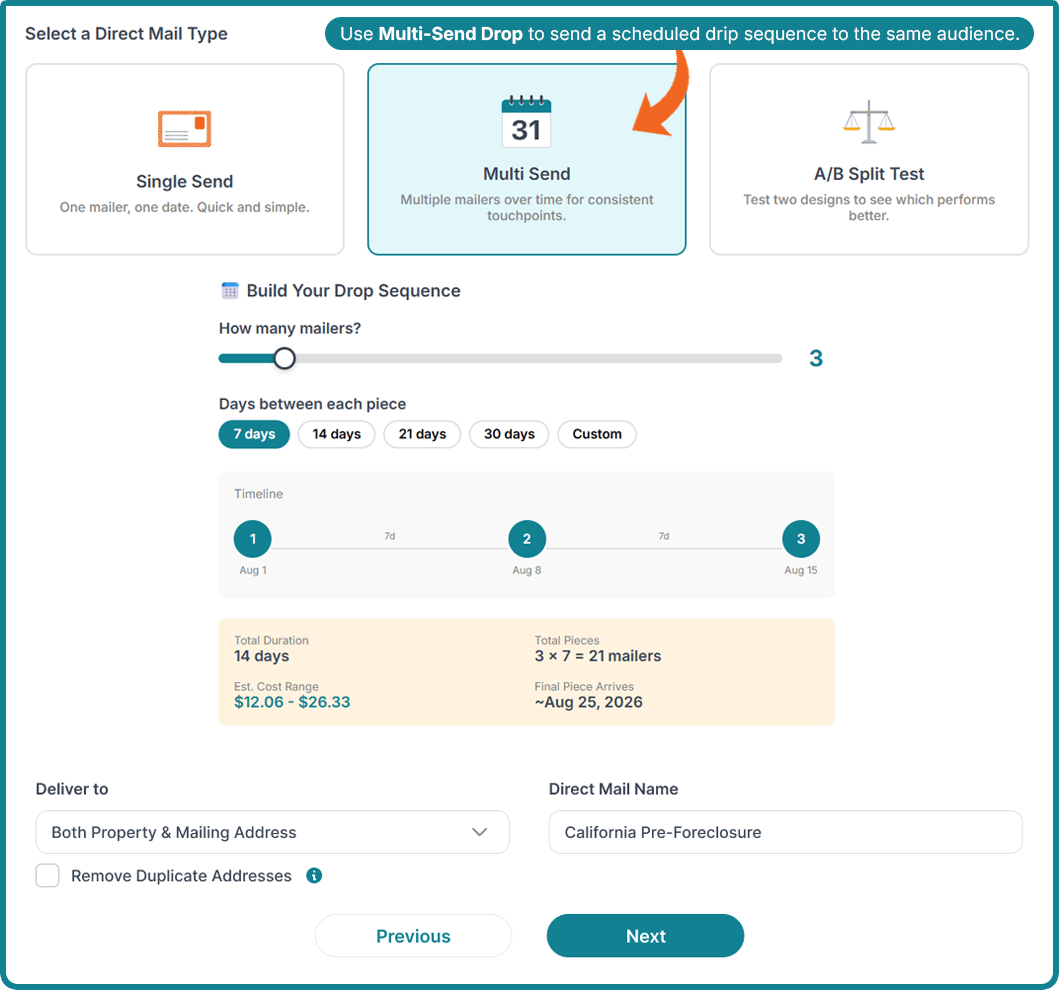
Multi send drop - Direct Mail Type

A Multi-Send Drop allows you to schedule a drip sequence of mailers to the same target audience over a set period.

You have the flexibility to define the number of mailings and the specific intervals between each send. This approach is highly recommended for most outreach efforts, as industry data shows that response rates typically peak by the third mailing.


Note: While the initial send is billed at checkout, subsequent mailers in the sequence are charged only when each order is locked for production. Multi-send drops require at least 1 recipient in each mail drop programmed in the sequence.


 A/B Split Test Drop
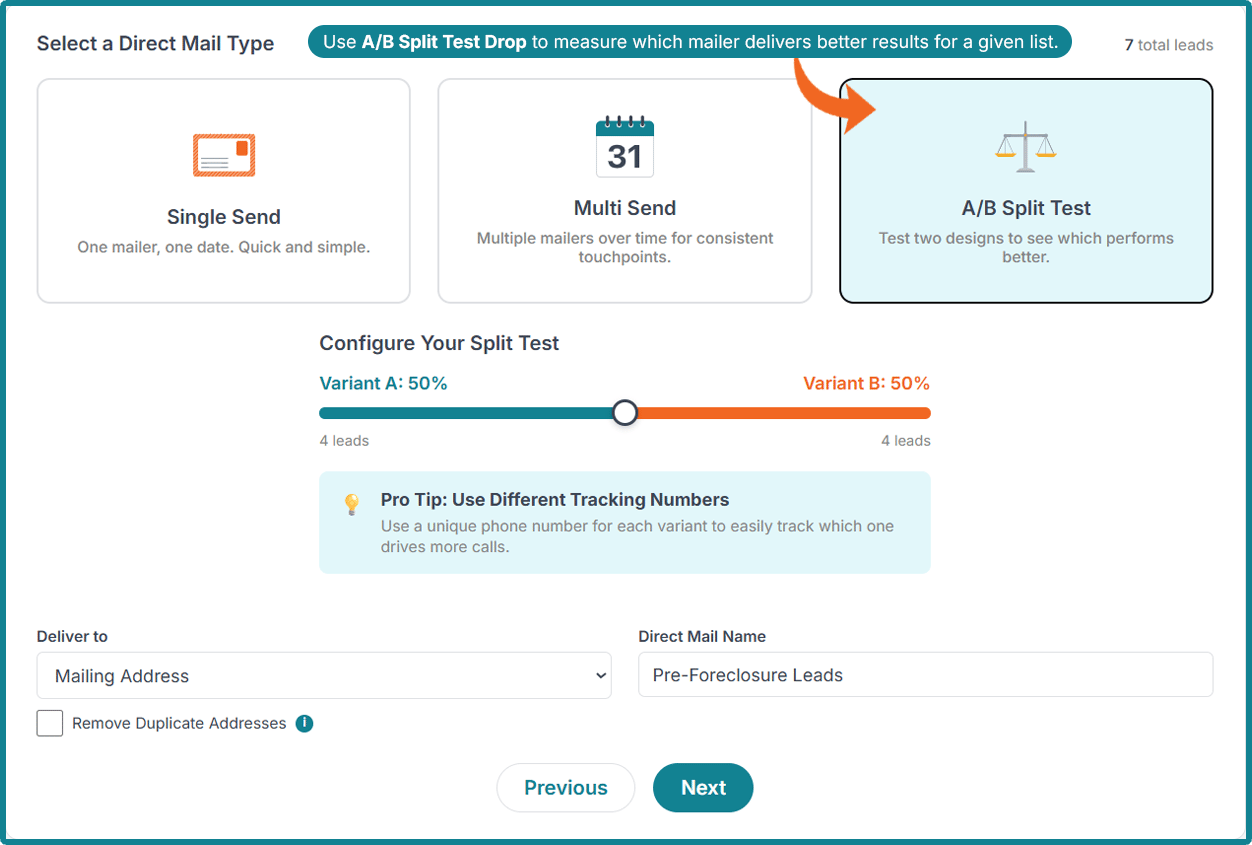
A/B Split Test Drop - Direct Mail Type

Note: To initiate this test type, at least 2 recipients are required. The best results are seen on campaigns with 300-500 sends.


Determine the most effective strategy by distributing two distinct mail variants to different segments of a single list.
 
With A/B Split Testing, you have full control over the split between Variant A and Variant B, making it an excellent tool for evaluating the effectiveness of different formats, sizes, or messaging styles. 

Important: Switching between Single Send, Multi Send, and A/B Split Test Drop types will reset all prior configurations. To avoid losing progress, finalize campaign type selection before customizing templates and settings.

Delivery Targeting

Delivery targeting options - Direct mail

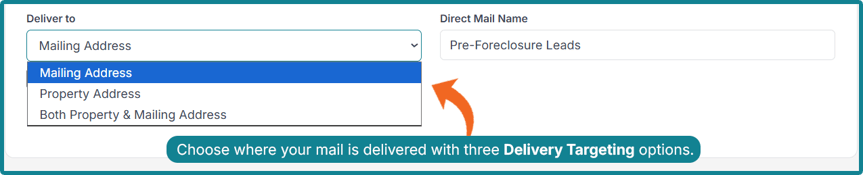
The property owner doesn’t always live at the address you’re interested in pursuing. Because of this, our Delivery Targeting feature allows you to send direct mail:

  • To the property address
  • To the mailing address
  • To both (the property and mailing address)

This increases your odds of reaching your intended recipient.


Pro Tip: To minimize costs and prevent waste, use the duplicate address suppression feature. This setting ensures that individuals at the same address receive only one mail piece and is a standard option for every campaign type.


How Does Team Member Access Work with the New Direct Mail Platform?

While team members enjoy comprehensive access to the Direct Mail platform—including campaign management, template customization, and order placement—certain administrative controls remain protected.

Specifically, only the primary account holder has the authority to enter or modify the sender's details and the business information linked to the primary account.

How Does Payment & Billing Work with the New Direct Mail Platform?

Payment & Billing Quick Guide

Single Send

Charged in full at the time the order is placed.

Multi Send

The first piece is charged at checkout. Future pieces are charged when each piece enters the fulfillment window, typically 4-6 days before the scheduled send date.

Accepted Payment Methods

Prepaid PropStream Marketing Credits or the debit/credit card saved in the account. 

Direct Mial Billing Guide

Additional Billing Notes to Consider

PropStream Prepaid Credits are automatically applied first to Direct Mail orders. Any remaining balance is charged to your saved debit or credit card.

If a payment fails, you'll be asked to update your payment information. Orders with unsuccessful payment retries will be canceled and must be reordered.


Pro Tip: Because each send in a Multi-Send Drop is billed separately, payment issues with one send will not cause subsequent sends to be canceled. If payment is updated promptly, the rest of the campaign will proceed as scheduled.


Fulfillment Locks

Customers can make changes to their order before it reaches the fulfillment window, which varies by mail type. Fulfillment windows are as follows:

Mail Type Edit Window
Printed Postcards Changes locked 3 days before the scheduled send date (T-3)
Handwritten Postcards Changes locked 4 days before the scheduled send date (T-4)
Hybrid Mail Changes locked 6 days before the scheduled send date (T-6)

Note: Once a piece enters its fulfillment lock window, it cannot be rescheduled, canceled, or edited.


Example Pricing Scenario Q&As

Q: Why did my pricing change?

Pricing is automatically recalculated whenever the recipient list or campaign configuration is changed. This includes adding or removing recipients, applying suppression lists, removing duplicate addresses, or changing the postcard size. The system always shows the most current pricing based on the actual billable recipients.

Q: What happens if my A/B test has a failed payment?

The same retry logic applies. If all retries are exhausted, that drop is canceled, but it will not affect other drops in the sequence. Customers will need to create a new activity for the canceled drop.

Q: Can I add or remove recipients after I’ve placed an order?

Yes, via the Edit Leads button on the campaign, up until the fulfillment lock window. If recipients are removed after payment, the difference is refunded as marketing credits. If recipients are added, a payment modal will appear for the additional charge.

Q: How do the US postal prices impact postcard prices?

A: The US Postal Service regularly reviews its pricing for sending mail nationwide. At PropStream, we do our best to help you get the best service price for sending mail. However, prices may change due to US Postal Service rate changes.

Explore the New Direct Mail Experience Today!

Whether you're sending your first campaign or scaling an established marketing operation, PropStream Direct Mail provides the tools you need to market more strategically, stay organized, and drive better results, at the best price point in the industry!

With a streamlined campaign workflow, a professional design studio, multiple mail formats, and built-in performance tracking, real estate professionals can now manage every stage of their direct mail strategy from within PropStream, fully supporting the journey to search, identify, connect, and transact seamlessly and affordably.

Try PropStream for 7 Days Free!

Try Our Updated Direct Mail Experience in Action!

Start your 7-day free trial today and see how PropStream can help you build your own winning playbook for real estate success.

Frequently-Asked Questions (FAQs)

How do I start a Direct Mail campaign?

You can start a Direct Mail campaign from two places in PropStream. From the Campaign Dashboard, click New Activity and select Direct Mail.

Alternatively, from the My Properties page, select one or more properties, click New Campaign Activity, and choose Direct Mail. You'll be taken to the Direct Mail Dashboard to set up your campaign.

Do I need to set anything up before I can send?

Yes. You'll need to add your sender information (your name or business name, address, phone number, and website) before you can create a campaign. This can be done from the Direct Mail Dashboard. Only the primary account holder can set up or edit sender information.

What is the difference between Single Send, Multi Send, and A/B Test?

Single Send is a one-time mailer to a list.

Multi Send is a drip sequence, meaning multiple mailers are sent to the same list at set intervals, which significantly improves response rates (the industry typically sees peak responses by the 3rd send). 

A/B Split Test sends two versions of a mailer to different segments of the same list, allowing customers to compare performance and identify which version converts best.

How many sends should I include in a Multi-Send Drop?

The industry standard recommendation is 5–7 touches before moving on from a lead. Most responses accumulate by the 3rd send. The exact number depends on your list quality, offer strength, and the value of a conversion. However, most experienced direct mail marketers won't drop a lead after fewer than 3 sends.

How many recipients do I need for an A/B Split Test?

You need at least 2 recipients. For statistically meaningful results, we recommend at least 300–500 recipients per variant.

What does Returned to Sender mean, and what should I do?

Returned to Sender (RTS) means a mail piece could not be delivered and was returned.

Customers can manage RTS recipients from the Delivered Campaign view. They can add returned recipients to a suppression list to prevent future mailings to that address, or to a marketing list for further outreach (including skip tracing to find better contact information).

Pro Tip: If using First-Class Mail, the physical mail will be returned to you if it is unable to be delivered to the recipient. With Standard Mail, you can review Return-to-Sender stats but the physical mail will not be returned to you.

What mail formats are available?

PropStream Direct Mail supports postcards (create your own or home services mailers), standard folded letters, hybrid letters, greeting letters, and the classic options from the previous direct mail experience. 

What is a handwritten postcard?

A handwritten postcard is a mail piece designed to look authentically handwritten, which typically generates higher open and response rates than standard printed mail. You can customize the message content and personalize it with merge fields (like the owner's name and property address), but the visual design is fixed to maintain the handwritten appearance.

Note: Handwritten-style is a font and not written by hand. The industry may refer to it as “robot-handwritten.”

Can I customize the design of a handwritten postcard?

No. Handwritten postcards use a controlled design to preserve their authentic appearance. You can customize the message content but not the layout, fonts, colors, or other visual elements. The full design editor is available only for printed postcard templates.

Can I save my custom design as a template?

Yes. After designing a postcard, you can save it as a reusable template in your My Templates tab for future campaigns. You can also choose to use the design for the current campaign only without saving it.

What are merge fields?

Merge fields are personalization placeholders that automatically populate with recipient-specific information when your mail is produced — for example, the property owner's first name, the property address, or the city. Using merge fields makes your mail feel personal and relevant to each recipient.

Where can I send mail — the property address or mailing address?

You can choose to send mail to the property address, the mailing address, or both. When selecting Mailing Address or Both, you can also remove duplicate addresses, so recipients who share an address receive only one piece of mail.

What does 'Remove Duplicate Addresses' do?

When enabled, the system consolidates any duplicate mailing destinations before calculating your final recipient count and pricing. For example, if 10 properties on your list share the same mailing address, they will be counted as one recipient rather than 10, reducing your costs and avoiding the need to send multiple pieces to the same address.

When am I charged for my campaign?

For Single-Send campaigns, you are charged in full when you place the order. For Multi-Send campaigns, you are charged for the first send at checkout. Future sends are charged when each send is locked for production—you are not charged upfront for the entire sequence. 

Refer to this section for more in-depth pricing information.

What payment methods are accepted?

For customers using the Single-Send function or creating small-batch sends, we recommend using PropStream Marketing Prepaid Credits for a more streamlined transaction, as they are automatically applied before your card is charged. Credit and debit cards can also be used for payment. 

Is there any special launch pricing?

Yes. For a limited time, PropStream Essential Plan customers will automatically receive updated discounted PropStream Connect Direct Mail pricing. 

What happens if my initial payment fails?

If your payment cannot be processed, you will see an immediate notification in PropStream and will be prompted to retry your payment or contact support. Your campaign will not be submitted until payment is successfully processed.

What happens if a payment fails for a future send in a Multi-Send campaign?

You will see an alert on your Direct Mail Dashboard and will be prompted to update your payment method. The system will retry the payment up to 3 times, with the third attempt occurring at least 24 hours after the first. If all retries fail, that specific send is canceled — but this does not affect other scheduled sends in your sequence. You can create a new Direct Mail activity for the canceled send if needed.

If I remove recipients after paying, do I get a refund?

Yes. If you reduce the number of recipients in a campaign after payment has been processed, the difference is refunded as PropStream Marketing Credits. These credits can be applied to future Direct Mail orders. 

Note: This change must be made before the fulfillment lock to receive refunded PropStream Marketing Credits.

When can I make changes to a campaign?

You can make changes to a scheduled campaign up until it enters its fulfillment lock window. The lock window depends on the mail type: 3 days before send for printed postcards, 4 days before send for handwritten postcards, and 6 days before send for hybrid mail. Once a send is locked, no changes can be made to that send.

Can I reschedule a send?

Yes, up until the fulfillment lock window. Go to the Direct Mail Dashboard, select the campaign, and click Reschedule on the relevant mail piece. You can move the date earlier or later within the production window.

Can I cancel a campaign after I've paid?

Yes, as long as the campaign has not yet entered its fulfillment lock window. If you cancel before the lock, any amount paid is refunded as PropStream Marketing Credits. Once a send is locked for production, it cannot be canceled.

Can I add or remove recipients after placing an order?

Yes — use the Edit Leads button on your campaign. You can add or remove recipients up until the fulfillment lock window. Adding recipients will trigger an additional payment. Removing recipients will result in a refund to your Marketing Credits.

What if I switch campaign type (e.g., from Single Send to Multi Send)?

Switching campaign types will reset your previous configuration. Make sure you have finalized your campaign type before completing template selection and settings.

Can my team members use Direct Mail?

Yes. Team members have full access to create, customize, manage, and monitor Direct Mail campaigns. The only restriction is sender information — only the primary account holder can add or update the business name, address, phone number, and website used on outgoing mail.

What happens if my team member tries to create a campaign but the sender information hasn't been set up yet?

Team members will see a message on the Direct Mail Dashboard saying 'Sender Information Required—please contact your account owner to set up the sender information before proceeding.' They will not be able to create a campaign until the primary account holder has configured sender information.

What metrics can I track in the Direct Mail Dashboard?

The dashboard shows Pieces Mailed, Scheduled Mail Pieces, Completed Mailings, and Returned to Sender. You can filter all metrics by time period. Delivered campaigns also show advanced analytics, including percentage delivered, percentage scanned, Return to Sender rate, remaining to deliver, and repeat leads. A geographic heat map shows where your mail is being delivered across states.

What are the campaign status labels?

Campaigns and individual mail pieces can have the following statuses: Scheduled (upcoming send, payment may still be pending for future pieces), In Fulfillment (currently in production), Delivered (all pieces sent), Canceled (canceled before or after production, as applicable), Failed (payment failed after all retries), and Paused (a Multi-Send sequence where a drop has failed and is awaiting resolution).

What does Returned to Sender mean?

Returned to Sender (RTS) means a mail piece could not be delivered and was sent back. From the delivered campaign view, you can manage RTS recipients by adding them to a suppression list (to prevent future mailings to that address) or adding them to a marketing list for further outreach. You can also skip-trace returned addresses to find more relevant contact information.

Can I export my campaign data?

Yes. Delivered and canceled campaigns include an Export Leads option that downloads a CSV file containing the recipient name, property address, mailing address, email address, phone numbers, and lead status.

How do the US postal prices impact postcard prices?

The US Postal Service regularly reviews its nationwide mail pricing. At PropStream, we do our best to help you get the best service price for sending mail. However, prices may change due to US Postal Service rate changes.

What is the difference between a campaign and a drop?

A campaign is the outreach channel you're using, such as Direct Mail, Email, or Dialer. A drop is how that campaign is sent. For example, within a Direct Mail campaign, you can choose a Single Drop, Multi-Month Drop, or A/B Split Test Drop. 

Subscribe To PropStream's Newsletter


Table of Contents

    Published by PropStream August 4, 2026
    PropStream