Jul 30, 2026 PropStream

PropStream Launches One-Click AI Summary Button for Instant Property Insights

Release Highlights

  • New AI Summary button added to the Property Details page.
  • A beginner-friendly way to start using PropStream Intelligence, with the flexibility to continue exploring the property through follow-up questions.
  • One click automatically generates an AI-powered summary for the property you're viewing. No manual prompts or setup required.
  • Highlights the investment insights that matter most, including ARV, comparable properties, owner equity, distress indicators, and linked properties.
  • Recommends logical next steps, such as running comps, opening ROI calculators, or skip tracing the property owner.
  • Available now on the PropStream web application.

Three months ago, we introduced the PropStream Intelligence (PSI) Assistant, your multilingual, AI-powered investment partner designed to help you analyze properties, answer questions, and uncover opportunities faster. Since its launch, we've seen many users incorporate it into their daily property research workflow.

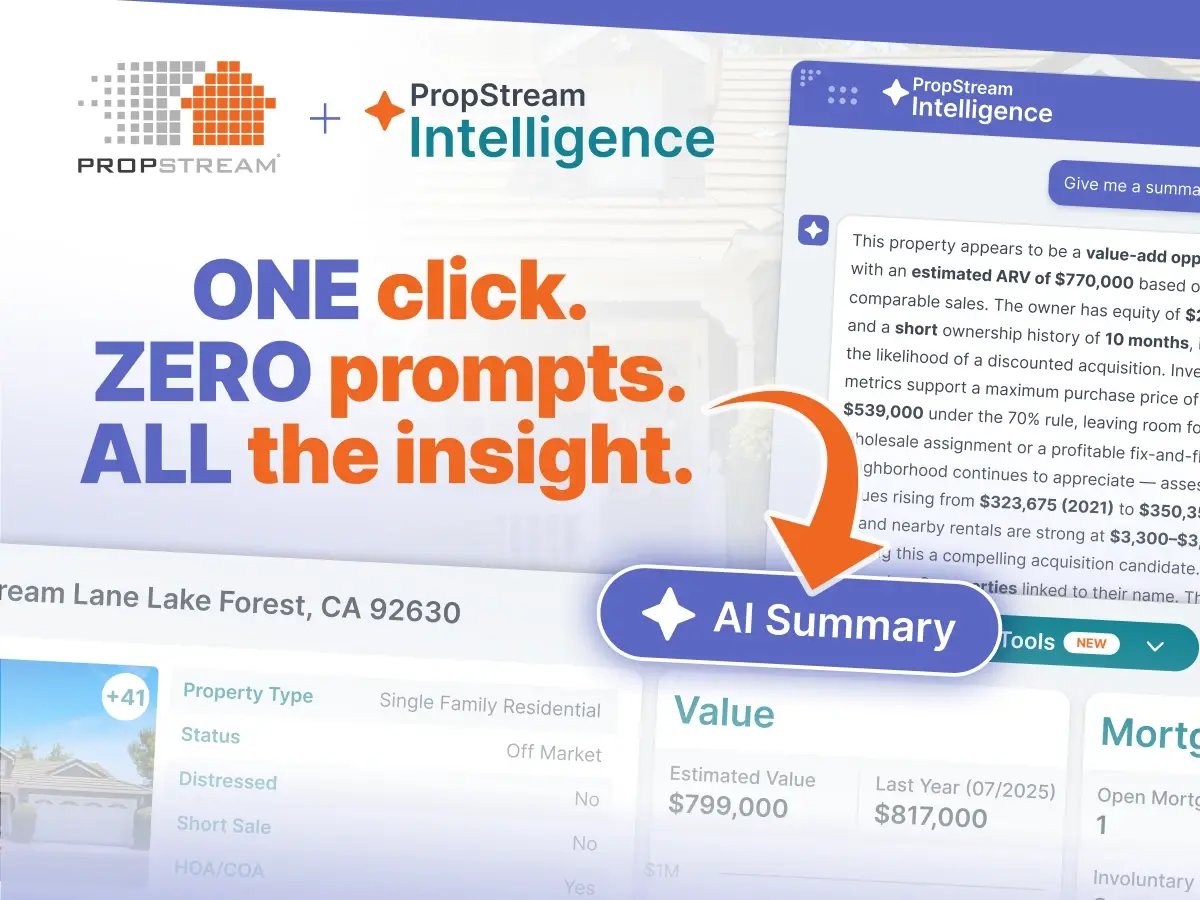
Today, we’re making this feature even simpler to use with the new AI Summary button on the Property Details page. With a single click, it generates an in-depth property summary through the PropStream Intelligence Assistant—no prompt writing required. A perfect companion for those new to PropStream and AI!
PropStream Ai Summary

Let’s dive deeper into what you can expect with this new feature.

What's Included in the AI Summary?

Clicking the AI Summary button automatically opens the PropStream Intelligence Assistant and generates a quick yet comprehensive summary for the property you're viewing.

AI Summary Button from PropStream

Each summary provides a concise investment briefing, including:

  • AI-generated overview of the property's investment potential
  • Estimated After Repair Value (ARV) based on comparable sales
  • Owner equity and ownership history
  • Recommended maximum purchase price using the 70% rule
  • Neighborhood appreciation and estimated rental income
  • Linked properties and distress indicators
  • Recommended next steps, such as opening the Rental ROI or Fix & Flip Calculator, reviewing comps, or skip tracing the property owner

The summary is intentionally brief, giving you a quick investment overview that's easy to scan. Once the summary is generated, you can continue the conversation with the PropStream Intelligence Assistant by asking follow-up questions tailored to your investment strategy.

For example:

  • Are there any signs the owner may be motivated to sell?
  • What rental income could this property generate?
  • How does this property compare to nearby homes?
 Watch this quick tutorial on How to Use the PropStream Intelligence Assistant in PropStream to learn how to get the most out of it. 

A Simpler Way to Start AI-Powered Property Research

At PropStream, our goal is to make AI-powered property research easy and accessible for every user. This release is another step toward making intelligent property analysis a seamless part of every investment workflow, from your first property search to your final investment decision.

AI Summary is just the beginning. Once you've generated your AI summary, continue exploring with the PropStream Intelligence Assistant or take the next step using PropStream's built-in tools. Search for new opportunities, identify the best deals with comparable sales and investment calculators, connect with property owners through skip tracing*, Click-to-Dial, or Dialer Campaigns, and manage your entire workflow from a single platform.


Ready to experience AI-powered property research?

Start your 7-day free trial to explore the PropStream Intelligence Assistant, investment calculators, comparable sales, lead generation, skip tracing, and built-in calling tools—all from one platform.


See Beyond the Property Details. Experience PropStream Intelligence.

 Start your free trial today and get 50 leads on us.

Frequently Asked Questions (FAQs)

What is the AI Summary button, and where do I find it?

The AI Summary button is available on the Property Details page in the PropStream web application. Click it to instantly generate an AI-powered property summary with no prompt required.

What information does the AI Summary include?

The summary highlights key investment insights, including ARV, owner equity, ownership history, rental potential, neighborhood trends, distress indicators, linked properties, and recommended next steps.

What can I do after I get my summary?

You can ask follow-up questions or continue your research using PropStream's built-in tools, such as property comps, the Rental ROI and Fix & Flip Calculators, skip tracing, Click-to-Dial, or Dialer Campaigns.

If you’re satisfied with the summary, you can export the answer to share offline with team members, clients, etc.


Is the AI Summary button available on mobile?

Not yet. The AI Summary button is currently available only in the PropStream web application.

Is the AI Summary button visible to all PropStream users?

 Yes. The AI Summary button is available to all PropStream users across every plan.

Do all PropStream users have access to PropStream Intelligence?

Yes. PropStream Intelligence is available to all PropStream users across every plan.

Does the AI Summary replace the PropStream Intelligence Assistant?

No. The AI Summary is simply the fastest way to get started with the PSI Assistant. Once your summary is generated, you can continue the conversation with the PropStream Intelligence Assistant by asking follow-up questions tailored to the property.

Subscribe To PropStream's Newsletter

Try PropStream for 7 Days Free!


*PropStream engages an independent third-party to perform skip tracing.


Table of Contents

    Published by PropStream July 30, 2026
    PropStream